
TL;DR:
- Webflow offers a low-maintenance, design-focused solution ideal for small teams with limited developer support, while WordPress provides greater flexibility for content-heavy and e-commerce sites but requires active management. The choice depends on organizational capacity, content volume, and integration needs, with switching platforms typically involving a costly rebuild. Rural organizations should select the platform that their team can sustain over time to avoid operational risks and technical debt.
For design-led marketing sites with small teams, choose Webflow. For content-heavy operations, multi-author publishing, or serious e-commerce, choose WordPress. That's the short answer. The longer one depends on your maintenance capacity, local developer access, and how much operational risk your organization can absorb.
WordPress powers roughly 42% of all websites globally as of mid-2026, while Webflow holds under 1% but is growing fast among design-focused teams. For rural chambers, EDOs, and small-city marketing teams, the real question isn't which platform is more popular; it is which one your team can actually keep running without a developer on retainer.
Choose Webflow if you:
- Have a small team with no local developer support
- Need a brand-forward marketing site with predictable maintenance costs
- Are building a chamber, tourism bureau, or EDO site that won't need heavy plugin customization
Choose WordPress if you:
- Publish frequently with multiple content contributors
- Need deep e-commerce, membership, or LMS functionality
- Have access to a developer or managed WordPress host
Table of Contents
- How do Webflow and WordPress compare side by side?
- What are Webflow and WordPress, and how do they work?
- Which platform is easier for your team to use day-to-day?
- How much design freedom does each platform give you?
- Who manages hosting, updates, and security?
- How does performance scale as your site grows?
- How do SEO and marketing integrations compare?
- Webflow Commerce vs. WooCommerce: which handles e-commerce better?
- What integrations and plugins does each platform support?
- What does each platform actually cost over three years?
- How hard is it to switch platforms later?
- What are the biggest risks and red flags for each platform?
- What questions should your team answer before choosing?
- Southwind Marketing's recommendation for rural communities
- Key Takeaways
- The platform decision most rural teams get wrong
- Southwind Marketing builds sites that rural teams can actually run
- Useful sources and further reading
- FAQ
How do Webflow and WordPress compare side by side?
| Dimension | Webflow | WordPress |
|---|---|---|
| Best for | Design-led marketing sites, small teams | Content engines, commerce, complex integrations |
| Ease of use | Visual editor; steep for non-designers | Familiar admin; Gutenberg is approachable |
| Design flexibility | Pixel-level visual control | Theme/builder dependent; Elementor adds flexibility |
| Developer access | Limited; exports static HTML only | Full PHP/database access |
| Hosting model | Managed, included | Self-hosted or managed (third-party) |
| Security | Platform-managed | Owner-managed; plugin risk is real |
| SEO tools | Clean markup, fast defaults | Yoast, Rank Math, flexible schema |
| E-commerce | Webflow Commerce (limited at entry tiers) | WooCommerce (extensive) |
| Integrations | Curated; Zapier/Make for gaps | 60,000+ plugins |
| Migration complexity | High; near-complete rebuild required | High; same caveat applies |
| Support | Official support + community | Massive community; no central support |

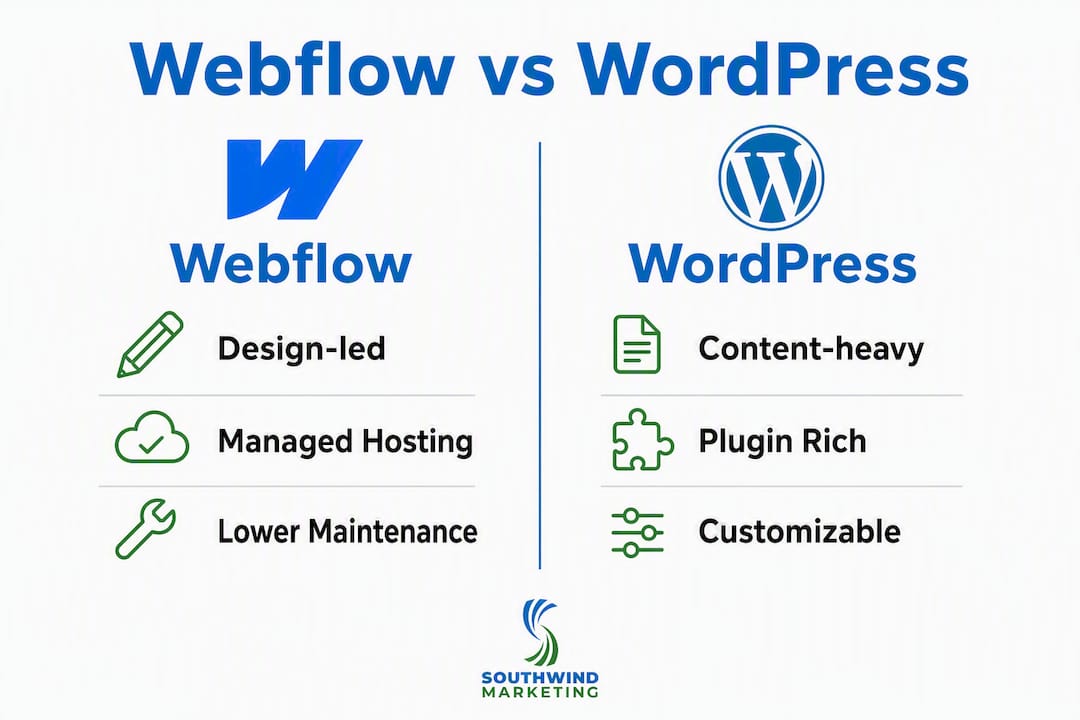
For small-town marketing teams, Webflow's managed model reduces operational overhead. WordPress wins when content volume or integration depth outgrows what Webflow handles cleanly.
What are Webflow and WordPress, and how do they work?
Webflow is a visual website builder with managed hosting and a built-in CMS. You design in a browser-based editor that writes clean HTML, CSS, and JavaScript. No server to configure, no plugin updates to run.
WordPress is open-source CMS software you install on a server or through a managed host. It powers everything from personal blogs to enterprise media sites, with thousands of themes and plugins extending its core.
Key ecosystem players:
- Gutenberg is WordPress's native block editor, introduced in 2018. It handles most content-editing tasks without additional tools.
- Elementor is a drag-and-drop page builder that runs on top of WordPress, giving designers more visual control without writing code.
- WooCommerce is the dominant e-commerce plugin for WordPress, turning any WordPress site into a full online store.
Which platform is easier for your team to use day-to-day?
Webflow's editor is powerful but not beginner-friendly. Practitioners consistently note that producing maintainable Webflow sites requires front-end design discipline, not just a willingness to click around. A non-designer can update text and images, but building new pages or sections without breaking the layout takes real skill.
WordPress's admin panel is familiar to most marketing professionals. Gutenberg makes basic page editing approachable, and Elementor extends that to more complex layouts. For multi-author editorial teams, WordPress's user roles, editorial workflow plugins, and scheduling tools are hard to beat.

Pro Tip: Before picking a platform, ask your team one question: "Who will build new pages six months from now?" If the answer is "whoever we can find locally," WordPress's larger developer pool is a practical advantage in most rural markets.
How much design freedom does each platform give you?
Webflow gives designers pixel-level control over layout, typography, animations, and interactions. You can build custom scroll effects, hover states, and micro-interactions without writing JavaScript. For a chamber or tourism bureau that needs a brand-forward site, that visual precision matters.
"Webflow is a professional design tool, not a no-code toy. Teams without front-end design expertise can produce brittle, hard-to-scale sites if they skip good structural discipline." — Webflow practitioners, via Refact
WordPress customization runs through themes and builders. A custom theme gives developers full control. Elementor brings visual editing to non-developers but adds page weight and can create maintenance complexity. For a template-based brochure site, WordPress with a quality theme is faster to launch. For a brand showcase or microsite where every pixel matters, Webflow is the faster, cleaner path.
Pro Tip: For rural website design, brand storytelling often matters more than feature count. If your site's job is to make a great first impression on site selectors or visitors, prioritize design control over plugin depth.
Who manages hosting, updates, and security?
Webflow handles hosting, SSL, CDN delivery, and platform updates automatically. Your team's maintenance list is short: update content, review forms, and renew your plan. That managed model meaningfully reduces the time cost for marketing teams without developer support.
WordPress requires active management. A typical maintenance checklist includes:
- WordPress core updates (several per year)
- Plugin and theme updates (often weekly)
- Backups and offsite storage
- Malware scanning and uptime monitoring
- Hosting account management
WordPress's plugin ecosystem includes 60,000+ options, but each plugin is a potential security or compatibility risk if left unmaintained. For rural organizations without IT staff, that maintenance surface area is the single biggest operational risk.
Stat: WordPress averages a Core Web Vitals pass rate of roughly 43–45%, while managed hosted builders consistently score higher out of the box.
How does performance scale as your site grows?
Out of the box, Webflow performs well. Its managed CDN, clean code output, and lack of plugin overhead give it a structural advantage on Core Web Vitals. For most small-town marketing sites, that default performance is sufficient without additional optimization.
WordPress performance varies widely. A well-configured WordPress site on a quality managed host, with a caching plugin and optimized images, can match or exceed Webflow's scores. Industry data confirms that properly built WordPress sites reach Lighthouse scores comparable to hosted builders. The risk is the average install, which often isn't optimized.
For rural organizations, the practical guidance is this: if your site will stay under 50 pages and traffic is moderate, either platform performs adequately when set up correctly. WordPress performance risk rises with plugin count and shared hosting.
How do SEO and marketing integrations compare?
WordPress has a deeper SEO toolset. Plugins like Yoast SEO and Rank Math give editors granular control over meta titles, schema markup, XML sitemaps, and breadcrumbs. For programmatic SEO, large content libraries, or sites publishing dozens of articles per month, WordPress's editorial and SEO plugin stack is hard to match.
Webflow's SEO is efficient rather than deep. Clean semantic markup, fast load times, and built-in sitemap generation cover most needs for a marketing-focused site. Integrations with HubSpot, Salesforce, and analytics platforms run through native embeds or Zapier.
For brand engagement workflows and CRM-connected lead capture, both platforms handle the basics. WordPress wins for complex marketing automation stacks; Webflow wins for teams that want clean, low-overhead integration without managing plugin dependencies.
Webflow Commerce vs. WooCommerce: which handles e-commerce better?
Webflow Commerce works for simple storefronts: merchandise shops, event ticket sales, or a small product catalog. Entry-tier plans carry transaction fees and product limits. Scaling up requires a higher-tier plan, and advanced features like subscriptions or complex shipping rules require workarounds.
WooCommerce on WordPress is the stronger choice for serious commerce:
- Large catalogs with hundreds of SKUs, variants, and categories
- Payment flexibility across Stripe, PayPal, Square, and regional gateways
- Extensions for subscriptions, memberships, wholesale pricing, and marketplace features
For a Main Street program selling branded merchandise or a chamber running a small event store, Webflow Commerce is sufficient. For a rural retailer with a real product catalog or a nonprofit running a donation storefront with recurring giving, WooCommerce is the more capable and cost-effective path.
What integrations and plugins does each platform support?
WordPress's 60,000+ plugin library covers nearly every use case: LMS platforms, membership portals, CRM connectors, event calendars, form builders, and more. That depth is its greatest strength and its greatest risk. Each plugin adds a maintenance obligation.
Webflow's integration ecosystem is curated. Native integrations cover analytics, forms, and basic CRM connections. For gaps, teams use Zapier or Make to connect to external tools. For local governments or chambers needing a specific integration, that may mean a workaround rather than a native solution.
For rural teams evaluating integration risk, the practical rule is: prefer hosted add-ons with active support over self-hosted plugins with small maintainer communities. A plugin abandoned by its developer is a security liability, not a feature.
What does each platform actually cost over three years?
Three-year total cost of ownership for a typical small-town marketing site:
| Cost Line | Webflow | WordPress |
|---|---|---|
| Initial build | varies | varies |
| Hosting (3 years) | included | typically $300–$900 |
| Plugins/tools | included | varies ($0–$900+) |
| Maintenance (3 years) | minimal | varies ($500–$1,500+) |
| Estimated 3-year total | ~$4,300–$17,000 | ~$3,800–$20,500 |
The ranges overlap significantly. Webflow's advantage is predictability: lower maintenance costs and no plugin licensing surprises. WordPress's advantage is ceiling: for complex sites, you can spend more and get more. For rural organizations with limited staff time, the maintenance savings on Webflow often outweigh the slightly higher platform fee.
How hard is it to switch platforms later?
Switching between Webflow and WordPress is not a migration. It's a rebuild. Webflow's CMS collections, interactions, and hosted forms don't translate into WordPress equivalents automatically. Exporting static HTML from Webflow preserves visual appearance but loses all dynamic functionality.
A realistic timeline for a small-town site rebuild:
- Discovery and content audit (1–2 weeks)
- Design and CMS architecture (2–4 weeks)
- Build and content migration (3–6 weeks)
- QA and testing (1–2 weeks)
- Launch and DNS cutover (1 week)
Total: 8–15 weeks, with rebuild costs typically starting at several thousand dollars. Before switching, ask:
- Is the current platform actually broken, or just unfamiliar?
- Can optimization solve the problem without a rebuild?
- Does the new platform solve the specific pain point, or just shift it?
Pro Tip: The most expensive platform decision isn't the one you make at launch. It's the rebuild you commission two years later because the first choice didn't fit the team's capacity. Get the operating model right the first time.
What are the biggest risks and red flags for each platform?
Webflow red flags:
- Hosting lock-in: your site lives on Webflow's infrastructure; exporting is limited
- CMS collection limits on lower-tier plans can constrain content-heavy sites
- Pricing scales up sharply for e-commerce or large CMS needs
- Thin local developer pool for advanced customization
WordPress red flags:
- Unmaintained plugins are the primary cause of security incidents
- Performance degrades quickly on shared hosting with plugin-heavy installs
- No central support; troubleshooting depends on community forums or paid developers
- Maintenance burden falls entirely on the site owner or their agency
For rural organizations, the WordPress risk isn't the platform itself. It's the gap between what the platform can do and what the team has capacity to maintain.
What questions should your team answer before choosing?
Work through these before committing to either platform:
- Do you have a developer on retainer or easy access to one locally?
- How many people will publish content, and how often?
- Do you need e-commerce, memberships, or an LMS?
- What's your annual budget for hosting and maintenance combined?
- How important is pixel-perfect brand control vs. content flexibility?
- What integrations are non-negotiable (CRM, event calendar, email platform)?
- What happens to the site if your agency relationship ends?
Decision shortcuts:
- No developer retainer and a small team? Lean toward Webflow.
- Publishing more than 10 articles per month or running a store? Lean toward WordPress.
- Need a specific plugin or integration that Webflow doesn't support natively? WordPress.
Southwind Marketing's recommendation for rural communities
For most chambers, EDOs, tourism bureaus, and small cities we work with, the default recommendation is a well-built WordPress site on a managed host, with a maintenance plan in place from day one. WordPress's developer community is larger, its content workflows are more familiar to staff, and its extensibility means the site can grow with the organization.
That said, Webflow is the right call for brand-forward marketing sites where design precision matters and content volume is low. A tourism microsite, a community branding campaign page, or a small-city economic development landing page can all thrive on Webflow when the team doesn't need to publish frequently.
Southwind Marketing built and migrated the City of Ulysses, KS from CivicPlus to a custom WordPress platform. That CivicPlus vs. WordPress comparison is a useful read for any small city evaluating its options.
Pro Tip: Not sure which platform fits your organization? A free 10-minute website audit from Southwind Marketing will surface your current site's gaps and give you a clear starting point for the platform conversation.
For chambers, EDOs, and local governments, the platform decision is secondary to the operating model. Pick the platform your team can actually maintain, then build it right.
Key Takeaways
The right platform is the one your team can maintain without burning staff time or budget on recurring technical debt.
| Point | Details |
|---|---|
| Default pick for rural teams | WordPress on a managed host suits most chambers, EDOs, and small cities with content needs. |
| Webflow's advantage | Managed hosting and minimal maintenance make it the right fit for design-led, low-content-volume sites. |
| 3-year cost overlap | Both platforms range from about $4,300 to $17,000 for Webflow and about $3,800 to $20,500 for WordPress, depending on build and maintenance choices. |
| Migration is a rebuild | Switching platforms mid-lifecycle typically costs several thousand dollars and 8–15 weeks of work. |
| Southwind Marketing's role | Southwind builds on both platforms and helps rural organizations match platform to operating capacity from the start. |
The platform decision most rural teams get wrong
The Webflow vs WordPress debate gets framed as a design question. It's actually an operations question. Most rural organizations I see struggle not because they chose the wrong platform, but because they chose a platform their team couldn't sustain. A beautiful Webflow site that nobody can update is worse than a plain WordPress site that gets fresh content every week. A WordPress install with 40 plugins and no maintenance plan is a security incident waiting to happen.
The teams that get this right ask one question first: "Who owns this site in year two?" If the answer is a staff member with no developer background, the maintenance model matters more than the feature list. If the answer is an agency with a retainer, you have more flexibility. Rural organizations often underestimate how much of the total cost of ownership is staff time, not platform fees.
The other mistake I see constantly: choosing a platform based on what a neighboring town or peer organization uses, without mapping it to their own content volume, team skills, or integration needs. What works for a city of 50,000 with a communications director and an IT department won't necessarily work for a chamber with one part-time staff member.
Southwind Marketing builds sites that rural teams can actually run
Choosing between Webflow and WordPress is one decision. Building a site your team can maintain, update, and grow without constant agency intervention is another. Southwind Marketing handles both.
For rural organizations across Oklahoma, Kansas, Texas, Iowa, Missouri, and Arkansas, Southwind provides website design and development on both platforms, managed hosting and maintenance plans, platform audits, and full migration support when a rebuild is the right call. The goal is always the same: a site that works for your team, not just your launch day.
Start with a free 10-minute website and visibility audit to see where your current site stands and which platform direction makes sense for your organization.
Useful sources and further reading
- W3Techs: WordPress vs. Webflow usage statistics — Real-time market share data; useful for understanding platform scale and adoption trends.
- Hashmeta: CMS Market Share and Core Web Vitals — Covers platform performance benchmarks and what CWV pass rates mean for SEO risk.
- ProjectCostEstimator: Webflow vs WordPress Cost, 3-Year Math — The most detailed cost model available for small-to-mid business sites; includes migration cost estimates.
- CommissioningDesk: Why Webflow can be a lower-maintenance option — Practitioner framing of the operating model trade-off; directly relevant for teams without developer retainers.
- Refact: Webflow vs WordPress practitioner insights — Honest assessment of Webflow's skill requirements and where WordPress's flexibility wins.
- Colorlib: Website Builder Market Share 2026 — Broad market data including performance benchmarks across CMS platforms.
- Southwind Marketing: Rural website hosting and management guide — Practical guidance on what rural organizations should actually pay for in hosting and maintenance.
FAQ
Should I switch from WordPress to Webflow?
Only if your current site's maintenance burden is unsustainable and your content volume is low. Switching requires a near-complete rebuild, typically costing several thousand dollars and 8–15 weeks of work.
What are the main downsides of using Webflow?
Hosting lock-in, CMS collection limits on lower-tier plans, and a thin local developer pool for advanced customization are the primary concerns for rural organizations.
Why are teams moving away from WordPress in 2026?
Maintenance burden is the most common reason: plugin updates, security monitoring, and hosting management require ongoing attention that small teams often can't sustain without a developer retainer.
Is Webflow better than WordPress for a small-town chamber or EDO?
It depends on content volume and team capacity. For a brand-forward site with infrequent updates, Webflow's managed model is often the better fit. For organizations publishing regularly or needing deep integrations, WordPress is the stronger choice.