
City staff must bring web content and mobile apps into line with WCAG 2.1 Level AA, the technical standard the DOJ Title II rule requires of state and local governments, with staggered compliance dates already running. The first move is a content inventory. The second is fixing the assets that hurt the most people: forms, PDFs, and video. The third is rewriting vendor contracts so procurement stops importing new problems while you fix the old ones.
TL;DR:
- Most cities should prioritize fixing inaccessible PDFs, adding captions to videos, and improving low-contrast text on existing pages first.
- Manual testing methods like keyboard navigation and screen reader walkthroughs are essential to accurately assess compliance beyond automated scans.
- Accessibility responsibilities should be assigned to a dedicated staff member, with clear vendor contract requirements for WCAG 2.1 AA conformance and remediation SLAs.
- Publishing regular public updates and feedback loops with residents using assistive technology enhances transparency and verifies real usability improvements.
- Compliance deadlines are already in effect for larger cities with a 2027 start date; smaller agencies have until 2028, with some extensions possible.
Table of Contents
- What Does a WCAG 2.1 AA Checklist for City Staff Actually Cover?
- How Do You Manually Test for WCAG 2.1 AA Compliance?
- How Do You Make Public Meetings Accessible From Agenda to Archive?
- Who Owns Accessibility, and What Should Vendor Contracts Require?
- What Are the DOJ Title II Compliance Dates and Exceptions?
- Southwind Marketing's Practical Roadmap for City Teams
- Why Feedback From Residents With Disabilities Matters More Than a Passing Scan
- The Accessibility Mistakes That Keep Showing Up on City Websites
- How Should Cities Communicate Accessibility Updates to the Public?
- What Tools Can City Staff Use to Monitor Accessibility Without a Developer?
- An Editorial Take on What Actually Moves the Needle
- Get Help Meeting WCAG 2.1 AA Without Adding to Your Workload
- Sources
- FAQ
What Does a WCAG 2.1 AA Checklist for City Staff Actually Cover?
A real municipal checklist isn't a copy of the W3C's success criteria with checkboxes next to it. It's that list translated into the content your city actually publishes: agendas, permit forms, park maps, council videos, tax payment portals. Below is a working checklist organized by content type, with the AA criterion behind each item, a fast way to check it, and who on staff typically owns the fix.
Structure and navigation
- Every page needs one visible H1 and a logical heading order (no skipping from H2 to H4). Check with a browser's heading outline tool. Owner: content authors.
- Pages need a "skip to main content" link before the navigation menu. Check by tabbing from the address bar. Owner: web developer or your CMS vendor.
- Navigation menus and layout stay consistent across the site (WCAG 3.2.3). Owner: whoever manages the template.
Headings and page structure
- Headings describe the section that follows, not decorative text. A heading that just says "More Info" fails the "descriptive" bar.
- Don't use bold or large text to fake a heading; screen readers only recognize real heading tags.
Links
- Link text describes the destination without needing surrounding context. "Read the parking ordinance" beats "click here" every time.
- Links that open PDFs or leave the site should say so, especially on forms and payment pages.
Images and alt text
- Every meaningful image gets alt text describing its function or content, not its file name.
- Purely decorative images (background textures, spacer graphics) get an empty alt attribute so screen readers skip them.
- Maps, charts, and infographics need a text equivalent nearby, not buried in a caption link.
Color and contrast
- Body text needs a 4.5:1 contrast ratio against its background; large headline text needs 3:1.
- Color can't be the only way information is conveyed. A red asterisk without the word "required" fails for colorblind residents.
Keyboard focus
- Every interactive element (menus, buttons, form fields, video controls) must be reachable and operable by keyboard alone.
- The current focus location must be visibly highlighted, not invisible.
Forms and labels
- Every input field has a programmatically associated label, not just placeholder text that disappears when typing starts.
- Error messages state what's wrong and how to fix it, in text, not just a red border.
ARIA use
- Use ARIA only when native HTML can't do the job. Overusing ARIA roles on elements that already have semantic meaning creates more screen reader confusion, not less.
Multimedia
- All video needs synchronized captions. All audio-only content (podcasts, recorded phone messages) needs a transcript.
- Council meeting livestreams need real-time captioning, not a promise to caption the archive later.
PDFs and documents
- PDFs need tagged headings, a logical reading order, and real text (not a scanned image of text). This is the single most common municipal failure point.
The highest-impact fixes for most cities, in order, are inaccessible PDFs, missing video captions, and low-contrast text on older page templates. Fix those three categories first and you'll clear the majority of complaints before you touch anything else.
Pro Tip: Before you remediate a single PDF, ask whether it needs to be a PDF at all. Converting a scanned permit application into a real HTML web form usually costs less staff time than tagging the PDF correctly, and it's more accessible either way.
How Do You Manually Test for WCAG 2.1 AA Compliance?
Automated scanners catch roughly a third of accessibility issues at best. The rest require a human doing the test a real user would do. Here's a repeatable sequence any staff member can run without developer tools, adapted from the kind of manual testing checklist North Carolina's state IT department publishes for its own agencies.
- Keyboard-only pass. Unplug your mouse. Tab through the entire page. Confirm the tab order follows the visual layout, a visible focus outline appears on every element, and nothing traps you in a loop. Pass/fail: if you can't reach or activate a feature without a mouse, it fails.
- Screen reader smoke test. Turn on NVDA (Windows, free) or VoiceOver (Mac, built in) and navigate the page by headings only, then by links only. Listen for whether headings make sense out of context and whether links describe their destination.
- Color contrast spot check. Run body text and button text through a free contrast checker like the WebAIM Contrast Checker. Anything under 4.5:1 for normal text or 3:1 for large text fails AA.
- Form walk-through. Fill out every field using only Tab and Enter. Submit it with an error on purpose. Confirm the error is announced by the screen reader and described in plain text, not color alone.
- PDF and document check. Open the file, select all text with Ctrl+A. If nothing highlights, it's an image, not text, and it fails outright. Then check the tagged reading order in Adobe Acrobat's Tags panel.
- Caption and transcript review. Play any embedded video with sound off. If you can't follow what's happening from captions alone, the captions aren't doing their job.
Automated tools are useful for triage, not verdicts. Run one to flag obvious contrast and markup errors, then confirm every flagged item with the manual steps above before you call anything fixed.
Pro Tip: Keep a simple pass/fail log for each test with a screenshot. When a resident files an ADA complaint, "we tested this on March 3 and it passed" is a far stronger position than "we assumed it was fine."
How Do You Make Public Meetings Accessible From Agenda to Archive?
Public meetings are where accessibility gaps become political problems fastest, because they're the most visible touchpoint between a resident and city government. Mapping the checklist to the meeting lifecycle keeps clerks and IT from working from different assumptions.
- Agenda creation. Publish agendas as tagged, searchable documents with plain-language section headers, not scanned images. Attachments (staff reports, exhibits) need the same tagging.
- Public notices and registration. Online registration forms need proper labels and error handling. Notices should mention how to request an alternate format or interpreter.
- Live webcasting. Real-time captioning must be accurate, not auto-generated garble, especially for names of streets, ordinances, and officials. Confirm audio levels for remote speakers before the meeting starts, not during it.
- In-meeting participation. Public comment tools, virtual hand-raising, and voting interfaces must work by keyboard and screen reader. Offer sign language interpretation on request, and say so on the agenda.
- Archives and minutes. Posted recordings need captions, not just the live version. Minutes and exhibits get remediated into accessible PDFs or HTML before they go in the permanent archive.
The most common failure across all five phases is treating the live meeting as the finish line. A caption feed that worked during the broadcast but wasn't saved into the archived video leaves your permanent record inaccessible, which is where most complaints actually originate.
Who Owns Accessibility, and What Should Vendor Contracts Require?
Accessibility fails in cities not because nobody cares, but because nobody's job description says they own it. Ada, not an IT ticket, and your governance structure should reflect that.
- Assign a responsible employee. Name one person (often the ADA coordinator or a communications director) with authority to enforce standards across departments, per DOJ's recommended structure.
- Write WCAG 2.1 AA into every procurement contract. Require vendors to warrant AA conformance, not just "accessibility best efforts." Cities remain liable for third-party vendor content even when a platform vendor built it, so contract language and acceptance testing are your real protection.
- Set remediation SLAs. Specify how many business days a vendor has to fix a reported accessibility defect, and what happens if they miss it.
- Require acceptance testing before launch. No new page, form, or vendor platform goes live without passing the manual test sequence above.
- Set a monitoring cadence. Quarterly automated scans plus an annual manual audit catches drift before it becomes a pattern.
- Document every remediation. Triage, fix, verify, log. A rubric of impact times frequency times public-facing importance keeps you fixing the parking-ticket form before the historical society newsletter.
Pro Tip: Put "must meet WCAG 2.1 AA" in writing in every new website, forms, and video vendor contract starting today, even before you've finished your first audit. New non-compliant content is easier to prevent than it is to fix later.
What Are the DOJ Title II Compliance Dates and Exceptions?
The compliance clock is already running. Public entities with a population of 50,000 or more must comply with the rule starting in 2027, and smaller entities and special districts have a later compliance date in 2028, as established by Department of Justice guidance. The Department later issued an interim final rule extending some of these dates, so cities should confirm their specific deadline against the current guidance rather than assume the original schedule still applies.
The rule carves out five narrow exceptions, and none of them are a blanket excuse to skip remediation:
- Archived web content that predates your compliance date and isn't currently used to conduct city business.
- Preexisting conventional electronic documents (PDFs, Word files) not currently used to apply for benefits, unless someone requests an accessible version.
- Content posted by a third party where the city didn't create it and doesn't control it, such as a public commenter's uploaded file.
- Individualized password-protected documents, like a personal utility bill.
- Preexisting social media posts made before your compliance date.
Two other terms matter in practice. A conforming alternate version and equivalent facilitation let a city provide accessibility through a different but substantially equivalent method, such as a staffed phone line replacing an inaccessible online form. Both require documentation, and neither should become the default answer to "we don't want to fix this page." Treat equivalent facilitation as a genuine accommodation, not an escape hatch.
Southwind Marketing's Practical Roadmap for City Teams
You don't need a five-year plan to get moving. A 30/60/90 day roadmap works:
- Days 1-30: Inventory every public-facing page, form, PDF, and video. Rank by traffic and public impact.
- Days 31-60: Remediate your top ten highest-impact assets, usually forms, payment pages, and recent council videos.
- Days 61-90: Update procurement language, schedule staff training, and set your monitoring cadence.
Train differently by role. Content authors need heading structure, alt text, and plain language. Developers need semantic HTML and ARIA fundamentals. Procurement officers need contract clause language and acceptance-testing checklists, drawn from resources like Section508.
Build four artifacts now: a remediation intake form, an accessibility statement template for your website footer, a standard procurement clause, and a monitoring calendar. Southwind Marketing's ongoing website support programs for municipalities and Southwind Guardian℠ hosting and maintenance work fold naturally into that monitoring cadence if you'd rather not build it from scratch.
Why Feedback From Residents With Disabilities Matters More Than a Passing Scan
An automated scan can tell you a page has proper heading tags. It can't tell you whether a resident using a screen reader can actually pay a water bill in under five minutes. That gap is why the most reliable municipal accessibility programs build in a feedback loop with actual residents who use assistive technology, not just internal QA staff.
Set up a low-friction way for residents to report a barrier: a dedicated email address, a short form, or a phone line staffed during business hours. Route every report to your responsible employee for logging and triage, the same rubric used for internal remediation work. Then close the loop. Tell the resident what you fixed and when, even if the fix takes a few weeks.
Consider a small standing panel of residents with disabilities who test major redesigns before launch, not after complaints roll in. A city redesigning its permitting portal gains more from twenty minutes with a screen reader user than from another automated scan, because the scan can't catch a form that's technically labeled correctly but still confusing to navigate by keyboard. This kind of real-world validation is also where digital-product thinking from outside pure compliance work pays off. Design consultancies working on public-facing engagement strategy for museums face the same challenge cities do: technical compliance and genuine usability are related but not identical goals.

The Accessibility Mistakes That Keep Showing Up on City Websites
A handful of failure patterns repeat across almost every municipal site Southwind Marketing has reviewed, and they're worth naming specifically because they're preventable.
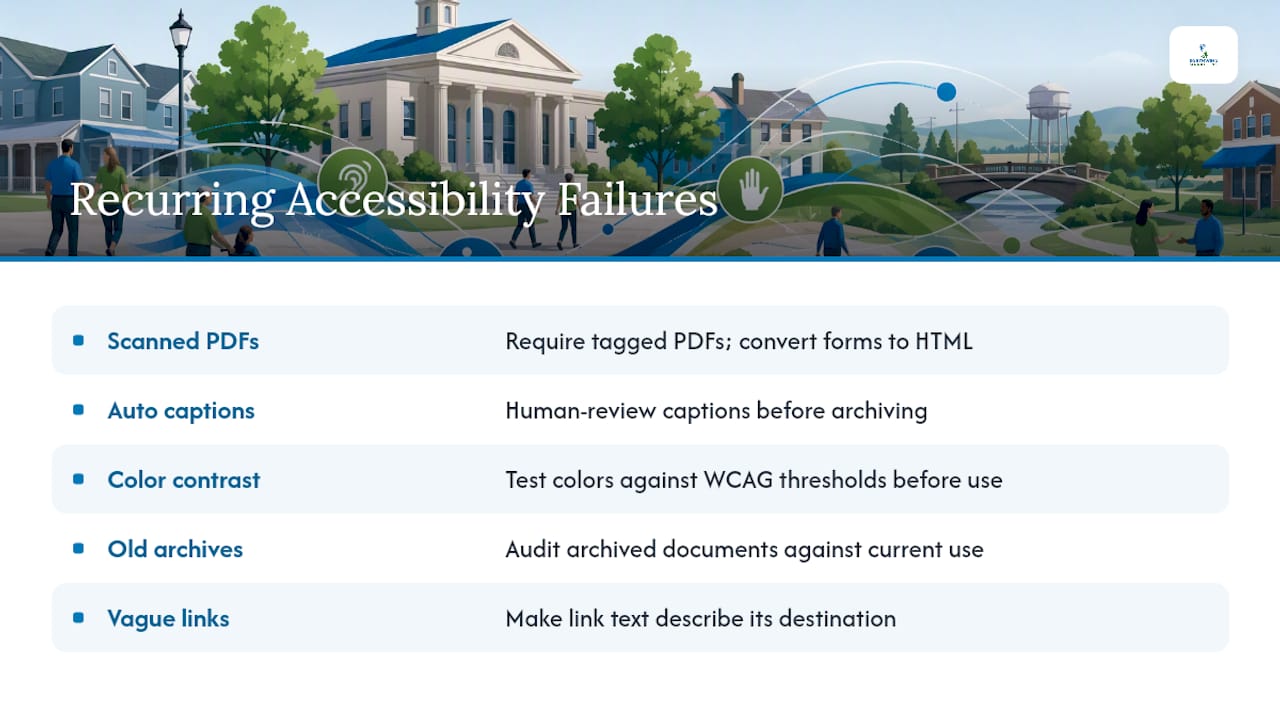
Scanned PDFs posing as documents. A city clerk scans a signed paper form and posts the image as a PDF. It looks like text. It isn't. Screen readers see a blank page. Fix: require tagged, text-based PDFs for anything new, and prioritize converting the highest-traffic scanned forms into real HTML forms.
Auto-generated captions left uncorrected. Platform-generated captions on a council meeting recording routinely mangle street names, ordinance numbers, and officials' names. Residents relying on captions get wrong information. Fix: budget a quick human review pass before archiving.
Contrast that looks fine to sighted staff but fails the math. A city's brand colors, a muted blue on white, often test at 3.8:1 when AA requires 4.5:1 for body text. Nobody notices until someone runs the numbers. Fix: test brand colors against WCAG thresholds before they go into a template, not after.
Old PDF archives nobody remembers exist. Multi-year budget documents, zoning maps, and historic minutes sit untouched for a decade. Some qualify for the preexisting document exception; others, still actively used, don't. Fix: audit archived documents against actual current use, not just age.
"Read More" links everywhere. A meeting agenda page with ten identical "Read More" links is a screen reader nightmare, since every link announces the same non-description. Fix: make every link's text describe its destination.
How Should Cities Communicate Accessibility Updates to the Public?
Fixing the site is half the job. Telling residents you fixed it, and how to get help if something still doesn't work, is the other half, and it's the part most cities skip entirely.
Publish a short, plain-language accessibility statement on your website, linked from the footer of every page. State your commitment to WCAG 2.1 Level AA, name a contact for accessibility issues, and give a realistic timeline for responding to reports. Update it when you complete a major remediation project, not just once and forget it.
When you launch a redesigned form or a remediated document library, say so through the same channels you already use for other city announcements: newsletter, social media, local press. A one-line note like "Our online permit forms are now fully accessible by keyboard and screen reader" builds goodwill and signals that accessibility isn't an afterthought bolted on after a complaint.
Multichannel outreach matters here because not every resident who needs to know follows the same channel. A CRM and communications tool like Southwind Connect℠ can help push these updates across email and SMS to residents who've opted in, alongside other city communications, though it's a supplemental communication tool and not a replacement for your official emergency notification systems. Consistency in how you announce accessibility progress, quarterly at minimum, tells residents with disabilities the work is ongoing rather than a one-time compliance exercise.
What Tools Can City Staff Use to Monitor Accessibility Without a Developer?
You don't need a dedicated accessibility engineer to keep tabs on drift, but you do need a routine, and the right free tools scaled to what non-technical staff can realistically run.
Browser extensions like WAVE and axe DevTools flag obvious markup and contrast errors in seconds and require no installation beyond the extension itself. Free contrast checkers like the WebAIM Contrast Checker take two color values and return a pass or fail against AA thresholds instantly. NVDA (Windows) and VoiceOver (built into every Mac) cost nothing and let any staff member run the screen reader smoke test described earlier without specialized training.
For ongoing monitoring rather than one-time checks, set a recurring calendar reminder, monthly for high-traffic pages and quarterly for the full site, to rerun automated scans and log results. Assign the review to whoever owns your responsible-employee role, and route flagged items into the same remediation intake and prioritization rubric used for procurement issues. Southwind Marketing's Southwind Guardian℠ hosting and maintenance service can fold routine accessibility spot checks into the same cadence as security and uptime monitoring, so it doesn't become a separate task nobody remembers to run.
An Editorial Take on What Actually Moves the Needle
The lesson that surprises most city teams isn't technical. It's that forms and meeting content, not homepage graphics, generate the overwhelming majority of real accessibility complaints, because that's where residents actually need to do something, not just read something.
One-off fixes don't hold. A vendor pushes a platform update, a new intern posts a scanned PDF, and the drift starts again within months. Ongoing monitoring, tied to procurement language that keeps new problems from entering the pipeline, matters more than any single remediation sprint.
Start with an inventory this week. Everything else follows from knowing what you actually have.
— Damien Denmark
Get Help Meeting WCAG 2.1 AA Without Adding to Your Workload
A marketing partner can build city websites accessible from the ground up, so your team isn't stuck retrofitting a template years after launch. They can handle the audit, the remediation, and the procurement language that keeps vendors accountable going forward, work that most rural city staff don't have the bandwidth to take on alongside everything else on their plate.
We serve local governments, chambers, and economic development organizations across Rural America. Municipal accessibility work is part of how we build every site, not an add on service billed separately later. If your city needs an honest look at where your web content stands against WCAG 2.1 AA, along with a straight answer on what it will take to fix it, request a review through our website design services for local government and we'll walk you through what an audit and remediation plan looks like for your specific site.
Sources
- Federal Register: Nondiscrimination on the basis of disability; accessibility of web information and services of state and local government entities
- Ada
- W3C: Web Content Accessibility Guidelines (WCAG) 2.1 (2018)
- NCDIT: WCAG 2.1 AA Manual Testing Checklist
FAQ
What Are the WCAG 2.1 AA Requirements?
WCAG 2.1 AA requires web content to meet success criteria covering navigable structure, sufficient color contrast, keyboard operability, captioned multimedia, and properly labeled forms, and it's the technical standard the DOJ Title II rule requires public entities to meet.
Is There a Checklist for WCAG 2.2 Guidelines?
The current DOJ Title II rule specifically incorporates WCAG 2.1 Level AA, so city staff should treat 2.1 AA as the legal baseline unless the rule itself is updated.
What Are the New WCAG Guidelines for 2026?
There's no new WCAG version specific to 2026. The Department of Justice did issue an interim final rule extending some Title II compliance dates, so cities should confirm their exact deadline against current ADA.gov guidance rather than the original 2024 schedule.
Is WCAG Legally Required for City Websites?
Yes. Under the Title II final rule, WCAG 2.1 Level AA is the mandatory technical standard for state and local government web content and mobile apps, with compliance dates that vary based on population size.
Who Should Own Accessibility Compliance Inside a City Government?
DOJ guidance recommends naming one responsible employee, often an ADA coordinator or communications director, with cross-department authority, since accessibility touches IT, procurement, communications, and every content-publishing department at once.