
Southwind Cloud is Southwind Marketing's Microsoft 365 licensing and fractional IT service, built for organizations that need dependable technology support without hiring a full-time administrator. It serves small businesses, nonprofits, chambers of commerce and economic development organizations, and local governments that have outgrown a do-it-yourself setup but don't need an enterprise IT department. The service bundles direct Microsoft licensing, device provisioning, security tools, and ongoing support, and it stacks cleanly with the marketing and web services many of these organizations already use.
TL;DR:
- Most organizations will find unmanaged Microsoft 365 licenses include unused seats and outdated permissions that a license audit can identify and correct.
- Small organizations benefit most from a CSP partner who offers direct support, consolidated billing, and proactive license management rather than relying on enterprise resellers.
- License provisioning, Windows 11 Pro keys, security add-ons, and support are bundled into a predictable, tier-based monthly cost aligned with the organization’s needs.
- Most local governments, nonprofits, and chambers can operate securely on a standard Office 365 Government plan without requiring the specialized GCC tier.
- The first 90 days involve discovering current setups, pilot provisioning, data migration, and security setup, with minimal disruption if a written onboarding plan is provided upfront.
Table of Contents
- What Does Southwind Cloud Include?
- Who Should Choose Southwind Cloud?
- What Does the CSP Model Mean for Your Licensing and Support?
- Do You Need Government Community Cloud for a .gov Domain?
- Onboarding and the First 90 Days
- How Do You Evaluate a Managed Microsoft 365 Partner?
- What Security and Compliance Standards Does Southwind Cloud Follow?
- Have Other Organizations Seen Results With Managed Microsoft 365?
- How Does Southwind Cloud Compare to Other Cloud Providers?
- What Does Southwind Cloud Cost?
- Why Rural Organizations Need a Different Kind of IT Partner
- Get Southwind Cloud Set Up for Your Organization
- Sources
- FAQ
What Does Southwind Cloud Include?
Most small organizations don't need a full IT department. They need someone who answers the phone, keeps licenses current, and stops small problems before they become downtime. Southwind Cloud handles the practical layer of Microsoft 365 that usually falls through the cracks when there's no dedicated IT person on staff.
The service covers three connected areas: licensing, security, and ongoing support.
- Microsoft 365 license procurement and provisioning. Southwind Cloud sets up and manages the right subscription tier for your team, including Windows 11 Pro license keys for new or existing machines.
- Password and credential management. Shared logins, multi-factor authentication setup, and cleanup of the "who has access to what" mess that builds up over years of staff turnover.
- Security add-ons. Endpoint protection and email security layered on top of standard Microsoft 365 plans, aimed at the phishing and malware attempts that hit small organizations just as often as large ones.
- Fractional IT support. Helpdesk access, patch management, and periodic license audits so you're not paying for seats nobody uses.
Southwind Cloud also bundles with Southwind Guardian℠ for hosting and website maintenance, and with Southwind Connect℠ for CRM and communications, so your licensing, your website, and your outreach tools come from one point of contact instead of three separate vendors.
Pro Tip: Before switching providers, ask for a license audit first. Most small organizations find at least a handful of paid seats tied to employees who left months ago.
Who Should Choose Southwind Cloud?
Southwind Cloud fits organizations stuck between two bad options: paying enterprise reseller prices for an account that never gets prioritized, or leaving Microsoft licensing to whoever on staff is "good with computers." Neither works well for long.
The organizations that get the most value tend to share a few traits:
- Rural small businesses running lean with a small number of employees and no in-house IT
- Chambers of commerce and economic development organizations who manage shared devices and staff turnover
- Nonprofits juggling grant-funded technology budgets and donor data security expectations
- Small city or county offices without the budget for a dedicated IT hire
If your organization issues devices with a .gov domain or handles regulated data, read the GCC section below before assuming you need the government-specific tier. Most local offices don't.
What Does the CSP Model Mean for Your Licensing and Support?
Southwind Marketing operates as a Microsoft Cloud Solution Provider, or CSP. The CSP program lets a partner sell, provision, bill, and support Microsoft cloud services directly on a customer's behalf, rather than routing every request through a call center queue. That structure changes how your organization actually experiences IT support day to day.
Partners in the CSP program work as either indirect resellers, going through a distributor, or direct-bill partners with their own billing relationship to Microsoft. That distinction affects who you call when something breaks and how your invoice gets structured.
- One consolidated bill instead of separate invoices from a distributor and a support vendor
- A direct escalation path, since the partner holds first-line support responsibility
- Someone accountable for license accuracy, not just license sales
When you sign on with a CSP partner, you're typically covered under the Microsoft Customer Agreement, which spells out that consolidated billing and support relationship in writing.
Do You Need Government Community Cloud for a .gov Domain?
No. Owning a .gov domain does not, by itself, require Government Community Cloud (GCC). GCC exists for agencies with specific data sensitivity or compliance obligations, such as CJIS, ITAR, or CMMC/DFARS requirements tied to federal contracts. A standard Office 365 Government plan already supports custom domains and unlimited user licensing for most local agencies.
Before assuming you need GCC:
- Inventory what data your office actually handles and whether it triggers a compliance requirement
- Check OMB's .gov domain guidance for registration and CIO authorization rules
- Ask your Microsoft partner directly whether your use case calls for a government tenant
Onboarding and the First 90 Days
Getting started with a new IT partner always raises the same worry: how much disruption is this going to cause? With Southwind Cloud, the first 90 days follow a predictable rhythm rather than a chaotic migration weekend.
- Discovery and license audit. Southwind reviews your current subscriptions, device inventory, and access permissions to find waste and gaps.
- Provisioning and pilot. New licenses, Windows 11 Pro keys, and security add-ons get set up for a small group before rolling out organization-wide.
- Migration and training. Data moves over, staff get a short walkthrough of any changed tools, and password management gets standardized.
- Security baseline setup. Endpoint protection and email security get configured and tested against your actual mail flow, not just a default template.
Your team's responsibilities are minimal but necessary: signing the Microsoft Customer Agreement, granting tenant access, and verifying domain ownership.
Pro Tip: Ask your incoming partner for a written 90-day plan before you sign anything. If they can't give you one, that's a preview of how support requests will go later.
How Do You Evaluate a Managed Microsoft 365 Partner?
Not every provider that sells Microsoft licenses actually supports what they sell. A few pointed questions in the sales conversation will tell you more than any glossy brochure.
- What are your support hours, and what's the actual escalation path when something breaks after hours?
- Is billing itemized and predictable, or does it change month to month with no explanation?
- Do you run a license optimization review, or do you just renew whatever was purchased last year?
- Can you point to references from nonprofits, chambers, or local governments, not just corporate clients?
- Can you provision Windows 11 Pro keys and security add-ons directly, or does that require a separate vendor?
Opaque billing, no migration plan, and an inability to answer the Windows 11 or security questions directly are red flags worth walking away from.
What Security and Compliance Standards Does Southwind Cloud Follow?
Security for a small organization isn't about matching a Fortune 500 checklist. It's about closing the gaps that actually get exploited: reused passwords, unpatched devices, and phishing emails that look convincing enough to fool a busy staffer.
Southwind Cloud layers protection at the points where small organizations are most exposed. Endpoint protection covers laptops and desktops against malware and unauthorized access. Email security add-ons filter phishing attempts and suspicious attachments before they reach an inbox, which matters given how often ransomware starts with a single clicked link. Password and credential management enforces multi-factor authentication and eliminates shared logins that survive employee departures.
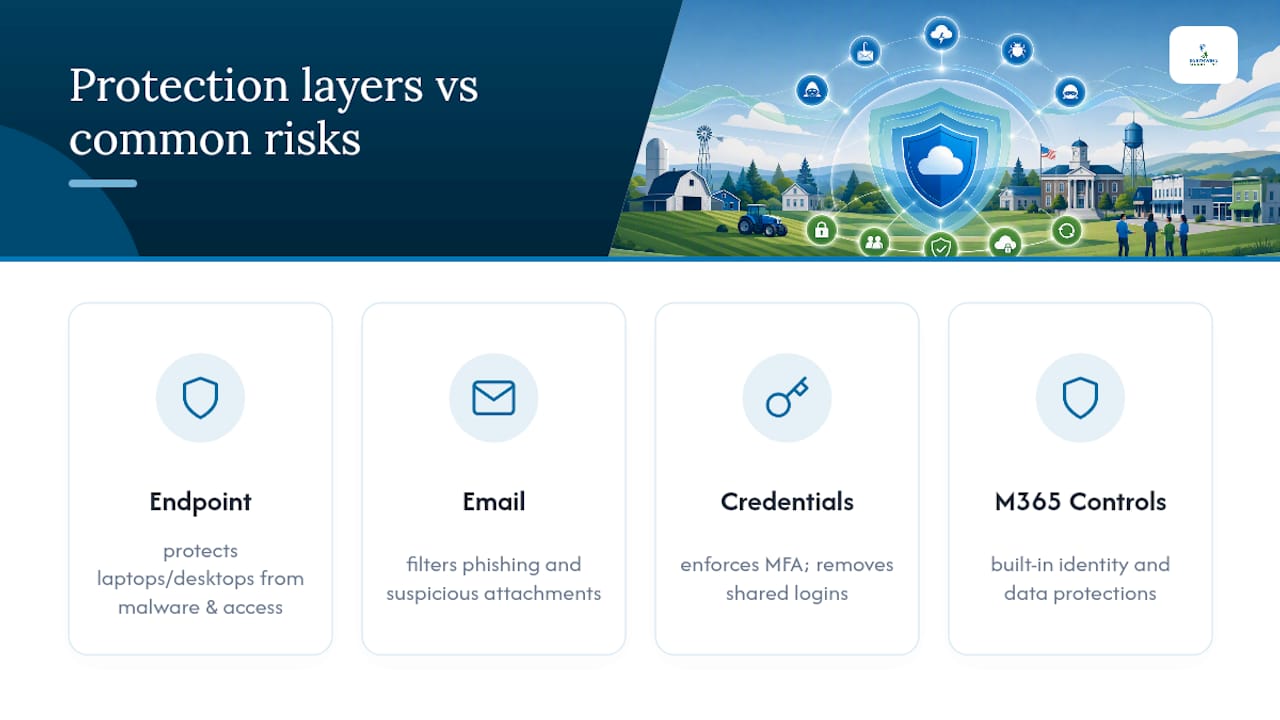
Licensing itself runs through Microsoft's standard security and compliance framework for Microsoft 365 subscriptions, inheriting the platform's built-in data protection and identity controls rather than relying on a patchwork of third-party tools. For organizations with grant-funded technology budgets, that consistency also simplifies compliance conversations with funders who ask about data handling.
Managed Microsoft 365 services generally prevent the "paid but unused" license problem that quietly drains small-organization budgets, while also making sure the licenses that are in use carry proper security configuration instead of default settings nobody ever reviewed.
None of this requires GCC or a specialized compliance tier for most local governments, chambers, or nonprofits. It requires someone actively managing the configuration instead of setting it once and walking away.
Have Other Organizations Seen Results With Managed Microsoft 365?
The pattern shows up consistently across small organizations that move from unmanaged licensing to a managed setup: fewer unused seats, faster resolution when something breaks, and staff spending less time troubleshooting instead of doing their actual jobs.
A chamber of commerce running six or seven staff accounts often discovers, during a first license audit, that two or three seats belong to people who left the organization a year earlier. A small city office frequently finds password reuse across shared devices that nobody flagged because there was no one whose job it was to notice. These aren't rare edge cases. They're the default state of Microsoft 365 accounts that grew organically without active management.
Managed M365 providers commonly help organizations right-size subscriptions, standardize renewals, and provide support availability that a two-person internal IT setup never could. The benefit isn't abstract. It shows up as lower renewal costs, fewer support tickets sitting unanswered, and a security configuration that actually matches how the organization uses its accounts day to day.
For chambers, EDOs, and small governments already working with Southwind Marketing on web and marketing services, folding Microsoft licensing into that same relationship means one fewer vendor to manage and one fewer separate invoice to track.
How Does Southwind Cloud Compare to Other Cloud Providers?
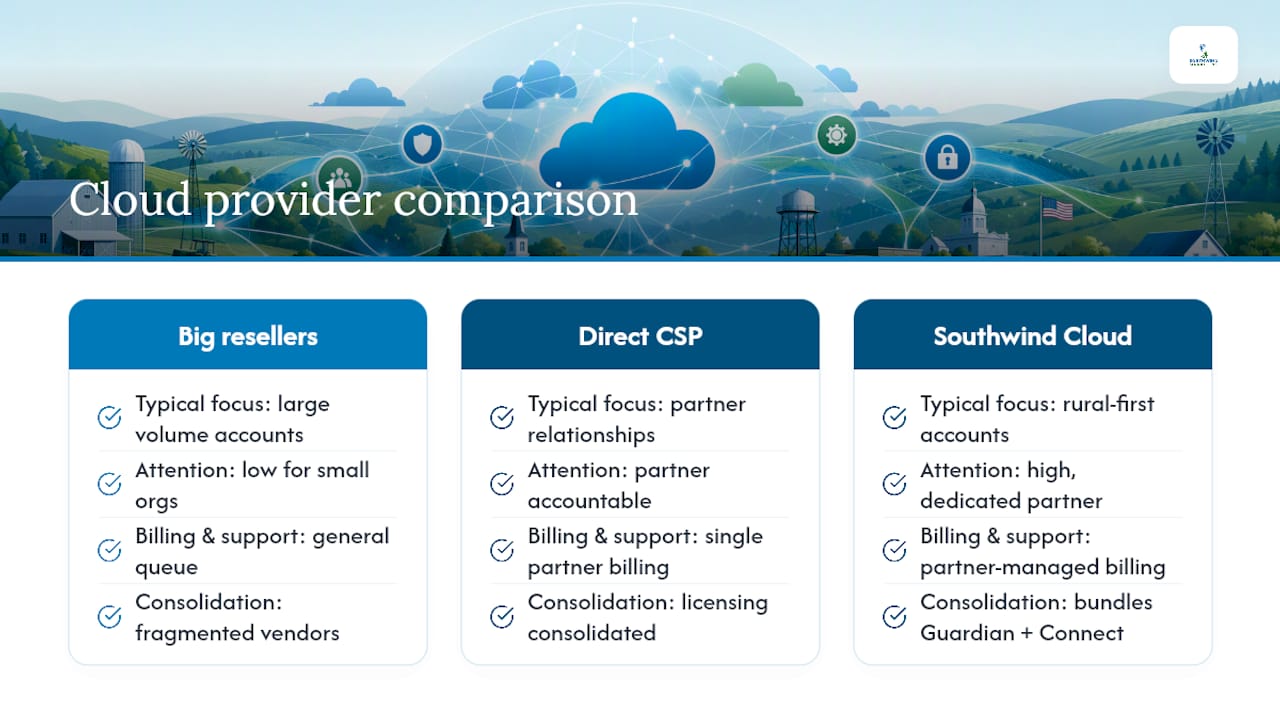
Enterprise resellers and big-box IT vendors serve a real purpose for large corporate accounts. They're built for volume, and a mid-sized organization with a dedicated procurement team can navigate that relationship fine. Small organizations without that internal staff often get lost in the queue.
The practical difference isn't price. It's attention. A direct Microsoft CSP relationship means your organization has a specific partner accountable for provisioning, billing accuracy, and support response, rather than a ticket number in a general queue. Southwind Marketing's rural-first client base means the account sizes Southwind Cloud is built around are exactly the account sizes that get deprioritized by larger resellers chasing bigger contracts.
The other distinction is consolidation. Organizations juggling separate vendors for hosting, CRM, and licensing deal with three different support lines and three different billing cycles. Bundling Southwind Cloud with Southwind Guardian℠ and Southwind Connect℠ collapses that into one relationship, which matters most to organizations where one person wears the marketing, IT, and communications hats simultaneously.
For agencies weighing procurement paths for broader technology needs, resources like government technology procurement guidance for public administration illustrate how public-sector buyers evaluate vendor accountability generally, a consideration that applies just as directly to IT and licensing decisions.
What Does Southwind Cloud Cost?
Pricing for managed Microsoft 365 services typically follows a per-user, per-month structure tied to the license tier your organization needs, plus a support fee for the fractional IT component. That's standard across the industry, and Southwind Cloud follows the same basic model rather than inventing a proprietary pricing scheme.
What varies more than the base structure is what's included at each tier. Some organizations need only license provisioning and helpdesk access. Others want the full stack: security add-ons, password management, and a dedicated audit cadence. The right approach is to start with a license audit, which shows exactly what you're currently paying for and what you're actually using, before committing to a specific tier.
Organizations already working with Southwind Marketing on marketing or web services often find that bundling Southwind Cloud into an existing retainer simplifies budgeting, since it consolidates vendor relationships rather than adding a completely separate contract with its own renewal date and its own point of contact. That's a scheduling and accountability advantage more than a pure cost play. The specific numbers depend on user count, license tier, and which add-ons your organization actually needs, which is why an initial consult and audit comes before any quote.
Why Rural Organizations Need a Different Kind of IT Partner
Rural chambers, small governments, and nonprofits get treated as an afterthought by providers built around big-city accounts and large corporate contracts. That's not a complaint. It's a structural fact about how most IT resellers allocate their attention, and it's exactly the gap Southwind Cloud was built to close.
Southwind Marketing works with communities and organizations that larger vendors routinely deprioritize, which means Southwind Cloud is designed around the account sizes, staffing realities, and budget cycles those organizations actually operate under. A chamber with four employees and a small county office with a shared IT budget aren't edge cases here. They're the primary account profile.
— Damien Denmark
Get Southwind Cloud Set Up for Your Organization
If your team is stretched thin managing licenses, passwords, and the occasional IT emergency without a dedicated hire, Southwind Cloud is built for exactly that gap. It gives you direct Microsoft licensing, Windows 11 Pro provisioning, security add-ons, and fractional IT support from one accountable partner, instead of a support ticket lost in an enterprise reseller's queue.
The clearest next step is a license audit and consultation. That conversation reviews your current subscriptions, flags unused seats, and outlines what a managed setup would look like for your specific organization, whether that's a five-person nonprofit or a county office managing shared devices across departments. Because Southwind Cloud comes from the same team behind Southwind Guardian℠ hosting and Southwind Connect℠ CRM and communications tools, organizations that already work with Southwind Marketing can fold licensing management into that same relationship rather than adding a fourth vendor to track.
Visit the Southwind Cloud service page to request an assessment and see what a consolidated licensing and IT setup looks like for your organization.
Sources
- Office 365 US Government - Service Descriptions | Microsoft Learn
- M-23-10 DOTGOV Act Guidance (White House / OMB)
- Microsoft Customer Agreement with a Cloud Solution Provider | Microsoft Licensing Resources
FAQ
What Is Southwind Cloud?
Southwind Cloud is Southwind Marketing's Microsoft 365 licensing and fractional IT service, covering license provisioning, Windows 11 Pro keys, security add-ons, and ongoing support for small organizations without in-house IT staff.
Does a .gov Domain Require Government Community Cloud?
No. A .gov domain doesn't automatically require GCC. GCC applies to agencies with specific compliance needs like CJIS, ITAR, or CMMC/DFARS, while most local offices operate fine on a standard Office 365 Government plan.
What Does a Cloud Solution Provider Actually Do?
A CSP partner sells, provisions, bills, and supports Microsoft cloud subscriptions directly, giving customers one point of contact instead of a general Microsoft support queue.
Can Southwind Cloud Be Bundled With Other Services?
Yes. Southwind Cloud bundles with Southwind Guardian℠ for hosting and Southwind Connect℠ for CRM and communications, consolidating vendor relationships for organizations that want one point of contact.
How Long Does Onboarding Take?
Most organizations complete discovery, license audit, provisioning, and security baseline setup within the first 90 days, with a pilot rollout before organization-wide deployment.