
Every Kansas municipal website now has a hard legal deadline attached to it. The Department of Justice requires state and local government websites and mobile apps to meet WCAG 2.1 Level AA, the technical accessibility standard covering everything from color contrast to keyboard navigation. Kansas cities and counties with a total population of 50,000 or more have a compliance deadline set in the near future. Cities under 50,000, plus special districts of any size, have an extended compliance deadline allowing more time beyond the initial date.
That extra year for smaller entities came from an Interim Final Rule issued in 2026 after public entities flagged staffing and budget constraints. The standard didn't change. Only the clock did.
Start now, regardless of your deadline:
- Inventory every page, PDF, and third-party tool on your domain.
- Name a single ADA coordinator who owns the project.
- Audit your five highest-traffic pages first: home, payments, agendas, forms, and public notices.
Deadline Callout: Kansas municipalities with a population of 50,000+ must reach WCAG 2.1 Level AA by April 26, 2027. Everyone else, including special districts, has until April 26, 2028. Miss it and you're exposed to a Title II complaint the day after.
Key Takeaways
Kansas municipalities must reach WCAG 2.1 Level AA by April 26, 2027 (population 50,000+) or April 26, 2028 (under 50,000 and special districts), and staying compliant requires ongoing testing, not a one-time fix.
| Point | Details |
|---|---|
| Know your deadline | Confirm your population count to determine whether you face the 2027 or 2028 compliance date. |
| Fix transactional pages first | Prioritize payments, permits, forms, and current agendas over archived content. |
| Combine testing methods | Pair automated scans with manual and assistive-tech testing, since scans alone miss most real issues. |
| Lock accessibility into vendor contracts | Require WCAG 2.1 Level AA conformance, remediation timeframes, and proof of testing from every vendor. |
| Build ongoing governance | Train staff on accessible templates and maintain the site continuously with support like Southwind Guardian℠. |
Where to Verify These Requirements Directly
- DOJ Interim Final Rule on compliance date extensions
- WCAG 2.1 Level AA success criteria (W3C)
- Ada
- Ada
This article is general information, not a substitute for advice from a qualified lawyer. Consult a qualified legal professional about your own circumstances before acting on anything here.
Table of Contents
- What Does a Kansas Municipal Website ADA Compliance Checklist Actually Cover?
- How Should Kansas Cities Prioritize Remediation Before the Deadline?
- How Do You Test and Document Website Accessibility Compliance?
- What Should Kansas Cities Require From Website and Software Vendors?
- How Do You Keep a Municipal Website Accessible After Launch?
- Sources
- FAQ
What Does a Kansas Municipal Website ADA Compliance Checklist Actually Cover?
A working checklist has to operate at two levels: the page itself and the files sitting on it. Most Kansas city sites fail on both, usually because nobody has looked at either since the last redesign.
Core page checks:
- Headings follow a logical order (H1, then H2, then H3) so screen readers can navigate structure, not just text.
- Every page is fully operable using only a keyboard. Tab through your own payment portal before a resident has to.
- Link text describes the destination ("View March Council Minutes," not "click here").
- Images carry descriptive alt text, especially on maps, staff photos, and infographics.
- Text contrast meets a 4.5:1 ratio against its background, per WCAG 2.1 success criteria.
- ARIA roles are applied only where native HTML can't do the job. Overuse causes more confusion than it solves.
Document checks: This is where most Kansas cities bleed risk. Agendas, minutes, permits, and utility forms pile up as scanned or untagged PDFs going back years. ADA.gov's guidance recommends tagging documents properly or offering an HTML/text alternative, and prioritizing by traffic rather than trying to fix everything at once.
Multimedia checks: Captions on prerecorded council meeting video, a plan for live captioning during streamed sessions, and transcripts for audio content like public hearings.

Forms checks: Every field has a properly associated label, error messages describe exactly what's wrong and how to fix it, and any CAPTCHA has a non-visual alternative.

Third-party tools: Payment processors, recreation registration systems, and agenda-packet software all count. If a vendor hosts it under your domain or brand, you own the accessibility outcome contractually, not just morally.
Pro Tip: Train your clerks and PIOs to build "born accessible" documents from the start, using accessible Word and PDF templates. It's far cheaper to publish clean the first time than to remediate three years of agendas the week before your deadline.
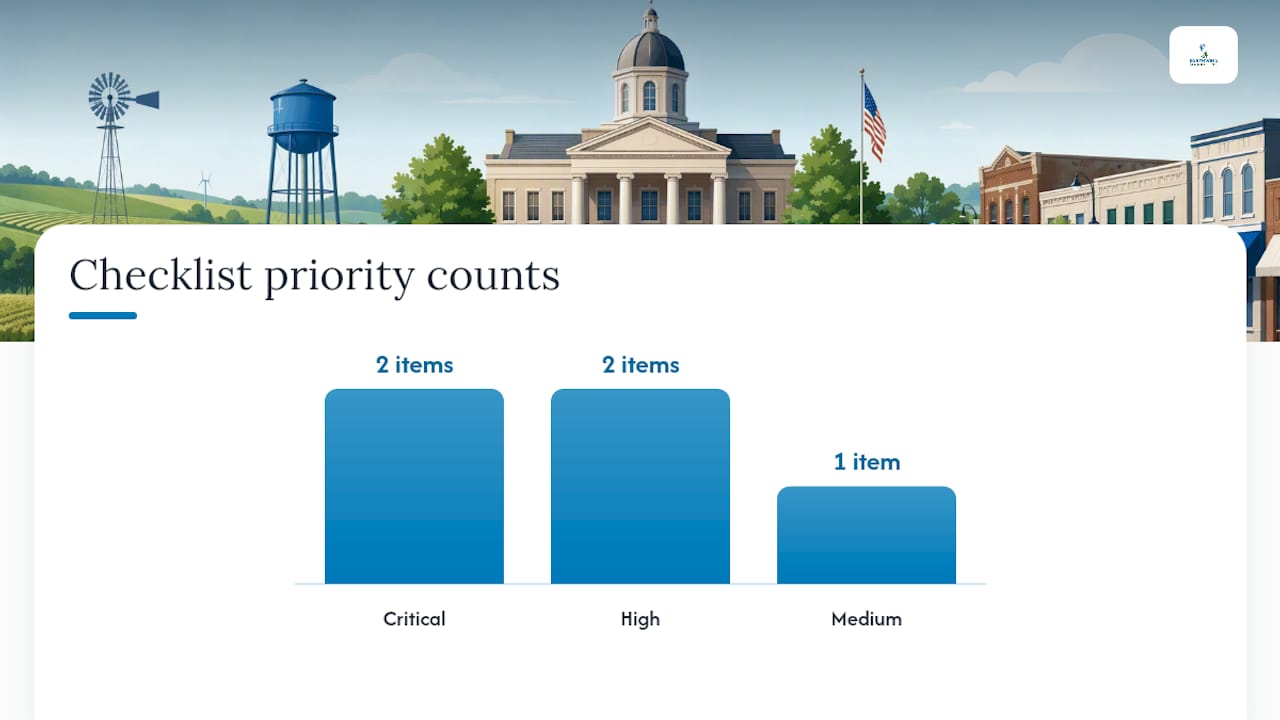
| Item | Priority |
|---|---|
| Home page navigation | Critical |
| Online bill pay / permits | Critical |
| Public forms & applications | High |
| Meeting agendas & minutes (recent) | High |
| Archived PDFs (older than 2 years) | Medium |
How Should Kansas Cities Prioritize Remediation Before the Deadline?
Fix what residents touch most and what carries the most legal exposure first. Archival content comes last, not first, because nobody's suing you over a 2019 newsletter.
Prioritization order:
- Transactional pages: utility payments, permit applications, tax portals.
- High-traffic informational pages: current meeting agendas, minutes, public safety alerts.
- Forms with legal or financial consequences: variance requests, public comment submissions.
- Multimedia from the current fiscal year.
- Archived documents, oldest last.
A city over 50,000 aiming for the April 2027 deadline should budget roughly six quarters: inventory and audit in quarter one, transactional-page fixes through quarter three, document remediation through quarter five, and a full manual audit before the deadline quarter. Smaller cities working toward 2028 have more runway but the same order of operations.
- Pair internal IT staff with a vendor for technical remediation and involve local disability advocates for manual testing.
- Quick wins that cut legal exposure fast: alt text on homepage images, keyboard-accessible payment flows, and tagging your three most-viewed PDFs.
- Don't wait on a full redesign to start. Fix what you can inside the current site while planning anything bigger.
How Do You Test and Document Website Accessibility Compliance?
Run an automated scan first with a general website audit checklist to catch technical issues early, such as those outlined in the SEOAudit | RADKA ADVERTISING guide. It gives you a repeatable, dated inventory of obvious problems: missing alt text, low contrast, broken heading structure. Scanner tools and CMS accessibility plugins are useful for volume, but they typically catch only surface-level issues.
Automated tools consistently miss dynamic content, complex form logic, and PDF tagging errors, which is why manual testing remains necessary to confirm real-world accessibility. A scan can tell you a form field exists. It can't tell you whether a screen reader announces the error message correctly when someone submits it wrong.
Manual test checklist:
- Navigate the entire site using only a keyboard, no mouse.
- Run a screen reader walkthrough using NVDA or VoiceOver on your top five pages.
- Confirm focus order matches visual order, especially in menus and modals.
- Test form labeling and error handling out loud, not just visually.
- Verify dynamic content, like a live agenda update, gets announced to assistive tech.
Bring in actual assistive-tech users when you can. A resident who uses a screen reader daily will find things your IT staff never will, running task-based scenarios like paying a water bill or locating next Tuesday's agenda.
- Log every test with date, tester, tool, and outcome.
- Link fixes to change tickets so there's a paper trail.
- Keep an evidence folder: screenshots, screen recordings, and remediation notes.
- Run automated scans monthly, manual spot checks quarterly, and a full audit annually.
What Should Kansas Cities Require From Website and Software Vendors?
Content and services delivered through a vendor are still your legal responsibility. If your recreation registration system or agenda-packet tool isn't accessible, the rule holds the public entity accountable, not just the software company.
Put this in every new contract or renewal:
- Written confirmation of WCAG 2.1 Level AA conformance.
- A defined remediation timeframe when issues surface, not an open-ended "we'll look into it."
- Proof of manual testing, not just an automated scan certificate.
- Advance notice before the vendor pushes updates that could break accessibility.
- Clear ownership of source files and document templates, so you're not locked into one vendor forever.
Watch for two common traps: cities that install an accessibility overlay widget and assume they're done, and cities that discover mid-contract they don't actually own their agenda templates or payment-portal source files.
Pro Tip: Require your vendor to train your content staff as part of the deliverable, not as a paid add-on. A trained clerk prevents more accessibility errors than any overlay ever will.
How Do You Keep a Municipal Website Accessible After Launch?
Compliance isn't a one-time project. It's a workflow. A site that passes its audit in March and gets three inaccessible PDFs uploaded in April is non-compliant again by May.
- Designate an ADA coordinator with authority to hold content back until it passes review.
- Require accessible templates for every Word or PDF document leaving city hall.
- Set an approval workflow so new content gets checked before it goes live, not after a complaint.
Monitoring cadence:
- Weekly automated scans to catch new errors as content gets published.
- Quarterly manual checks on high-risk flows like payments and forms.
- Annual full manual audit, ideally with outside assistive-tech testers.
Publish an accessibility statement with a direct feedback channel, and document every request and fix. That log is your best legal protection if a complaint ever arrives. Ongoing platform maintenance, patching, and uptime monitoring through a service like Southwind Guardian℠ keeps the technical side from quietly drifting out of compliance between audits.
Why accessibility-by-design beats a last-minute scramble
Kansas municipalities are drawing more ADA attention than they did even two years ago, and the pattern is predictable: towns that treat accessibility as a one-time vendor fix keep paying to fix it again. Southwind Marketing builds accessibility into the site from the first wireframe, not as a bolt-on widget, and trains city staff to publish born-accessible documents so the problem doesn't come back. Southwind Guardian℠ handles ongoing hosting and monitoring, Southwind Connect℠ gives residents accessible alternative channels for alerts and notifications, and Civic Intelligence℠ surveys residents to catch usability gaps before they become complaints. Every engagement runs on transparent, flat pricing, with no surprise add-ons and no vendor lock-in that traps a city's own content in someone else's system. You can see that approach in practice in Southwind's portfolio of municipal and community work.
Get a practical next step before your deadline hits
Waiting until the quarter before April 2027 or April 2028 is how cities end up paying rush rates for remediation they could have spread out over two years. A Southwind Marketing accessibility review gives you a prioritized punch list of what's broken, a plain-language cost estimate with no hidden fees, and a training plan for the staff who publish your content every week. It's a 10-minute request that turns a vague compliance deadline into a concrete to-do list. Start with the free website and visibility audit and find out exactly where your city stands before the clock runs out.
Sources
- Extension of Compliance Dates for Nondiscrimination on the Basis of Disability; Accessibility of Web Information and Services of State and Local Government Entities
- State and Local Governments: First Steps Toward Complying with the Americans with Disabilities Act Title II Web and Mobile Application Accessibility Rule
- WCAG 2.1 Level AA overview — University accessibility resource
FAQ
What are the requirements for an ADA website compliance checklist?
A working checklist covers page-level checks (headings, keyboard navigation, contrast, alt text), document accessibility (tagged PDFs), multimedia captions, accessible forms, and vendor accountability for third-party tools, all measured against WCAG 2.1 Level AA.
What is required for a website to be ADA compliant?
Under Title II, state and local government websites and apps must meet WCAG 2.1 Level AA, which sets specific technical criteria for contrast, navigation, structure, and document tagging.
Do government websites need to be ADA compliant?
Yes. Title II of the ADA covers all state and local government entities, including Kansas cities, counties, and special districts, with compliance deadlines of April 26, 2027 or April 26, 2028 depending on population.
What is the best ADA compliance tool for a website?
No single tool or overlay makes a site compliant. Effective municipalities combine automated scanning, manual testing, and assistive-technology user testing, an approach a firm experienced in municipal accessibility remediation like Southwind Marketing builds into every project from the start.
Does a Kansas city need a lawyer to handle ADA compliance?
Not necessarily for the technical work, but legal counsel is useful for reviewing vendor contracts and documenting your remediation efforts in case of a complaint. Your accessibility coordinator and IT team typically handle the day-to-day technical checklist.