
The fastest way to get people to a downtown event is simple to state and harder to skip: publish a single canonical event page with accurate event markup, then amplify it through Google Business posts, partner shares, event listings, social media, email, and targeted ads, in that order. Skipping the page and jumping straight to social posts is the single most common mistake organizers make, and it costs you search visibility you can never fully recover once the event date passes.
TL;DR:
- An effective event promotion strategy requires creating a single, well-structured event page with accurate markup before amplifying it through multiple channels.
- Google Business Profile event posts, partner shares, and community calendar listings are high-impact, cost-effective tools that should link back to the canonical event page.
- Consistent, sequential social media and email campaigns, combined with targeted paid ads in the final days, significantly increase attendance.
- Building partnerships with local influencers, online communities, and using user-generated content can boost trust and reach within the community.
- Accessibility and tracking are essential; ensure content is inclusive with alt text and captions, and use UTM tags, QR codes, or discount codes to evaluate promotional effectiveness.
Table of Contents
- How Do You Promote Downtown Events Online, Step by Step?
- Why Does Your Event Need One Canonical Landing Page?
- How Do You Use Google Business Profile for Event Promotion?
- What's the Best Social Media Strategy for Event Promotion?
- How Should You Sequence Email and CRM Outreach?
- How Do You Get Downtown Merchants and Sponsors to Help Promote?
- Where Should You List Your Event Online?
- When Should You Run Paid Ads for a Downtown Event?
- How Do You Track Whether Online Promotion Actually Worked?
- Building a Repeatable System for Every Event
- How Does SMS and Mobile Marketing Fit Into Event Promotion?
- Should You Work With Local Influencers for a Downtown Event?
- How Do You Engage Local Online Communities and Forums?
- Can Contests and User-Generated Content Boost Turnout?
- Is Your Online Event Promotion Accessible to Everyone?
- Practical Perspective: Small Budgets, Volunteer Teams, and Rural Realities
- How Southwind Marketing Helps Downtowns Promote Events
- Sources
- FAQ
How Do You Promote Downtown Events Online, Step by Step?
Every channel below plays a different role. Some build awareness, some drive conversion, and mixing up the order wastes effort you don't have to spare.
- Event landing page with schema markup — your source of truth; every other channel should link back here.
- Google Business Profile event posts — free, high-visibility placement in Search and Maps for the venue and any participating businesses.
- Community event calendars and listings — submit early; many require 30 days' notice.
- Partner and sponsor shares — downtown merchants, chambers, and vendors resharing your content to their own followers.
- Social media (organic and paid) — ongoing content plus targeted boosts in the final two weeks.
- Email and CRM sequences — reminders that convert interested people into confirmed attendees.
- Paid ads — geo-targeted boosts layered on top once organic reach plateaus.
If you're a one-person shop, the event page and the partner kit come first. Everything else is easier once those two exist, because partners and social posts alike just link back to the page. A small team can split work by channel: one person owns the page and listings, another owns social and email, and a third chases partner shares. Event marketers now use around 9.5 promotion channels on average, but the same report finds email, organic social, and local partnerships deliver the highest return, so those three deserve your attention before anything paid.
Why Does Your Event Need One Canonical Landing Page?
Google's own guidance is direct on this point: every event needs its own indexable page with accurate structured data, and a calendar page listing multiple events doesn't qualify for the enhanced event experience in Search results. That means your community calendar listing should point to your event page, not replace it.
A properly marked-up page uses schema.org/Event with the name, start and end dates, location, an offers.url pointing to tickets or RSVP, and an image. If the event gets postponed or canceled, update the eventStatus field immediately. Outdated markup showing a canceled event as active is a common and avoidable error.
Most website platforms handle this through a plugin or a built-in event content type; WordPress sites often use event plugins that generate the schema automatically, while custom-built sites may need a developer to hand-code it. Before publishing, check that your page validates cleanly, that dates match your Google Business posts and printed materials exactly, and that the ticket link actually works. A structured data guide covering rich results is worth bookmarking if your team wants to understand the broader opportunity beyond events alone.
How Do You Use Google Business Profile for Event Promotion?
Google Business Profile lets you publish event posts directly into Search and Maps, complete with a title, dates and times, a photo or video, and an action button linking to your ticket or RSVP page. Skip the start and end time and Google will display the event as running the full day, which confuses people checking hours before heading downtown.
Keep these practices in mind:
- Verify your Business Profile before relying on it. Unverified listings show up less reliably in local results.
- Edit the post immediately if a detail changes. Stale posts create the same confusion as stale schema.
- Ask every participating merchant to post the event on their own profile, not just the main venue.
Learning to optimize a Google Business Profile for local rankings pays off well beyond one event; it's foundational infrastructure your downtown will reuse for every future one.
What's the Best Social Media Strategy for Event Promotion?
A content calendar beats posting whenever you remember to. A workable weekly cadence looks like this:
- Four to six weeks out: announce the event with a save-the-date graphic and a link to your event page.
- Three weeks out: vendor and sponsor spotlights, one per post, tagging each business directly.
- Two weeks out: countdown posts, ticket reminders, and behind-the-scenes content.
- Final week: daily posts including at least one short video reel, per the Eugene downtown marketing toolkit's recommendation for frequent posting in the last stretch.
- Day of: live updates, parking and weather notes, and reminders for stragglers.
- Day after: a recap post with photos, thanking partners and teasing next year.
Build a partner kit before you need it: square and vertical image sizes, short and long captions, alt text for accessibility, UTM-tagged links, and suggested post dates. This removes the friction that keeps partners from sharing.
Pro Tip: Boost your countdown and day-of posts, not your initial announcement. Awareness content works fine organically; conversion content benefits more from paid reach when the deadline is close.
Choose the "engagement" or "traffic" objective for boosted posts rather than "reach," since reach optimizes for eyeballs, not clicks to your ticket page.
How Should You Sequence Email and CRM Outreach?
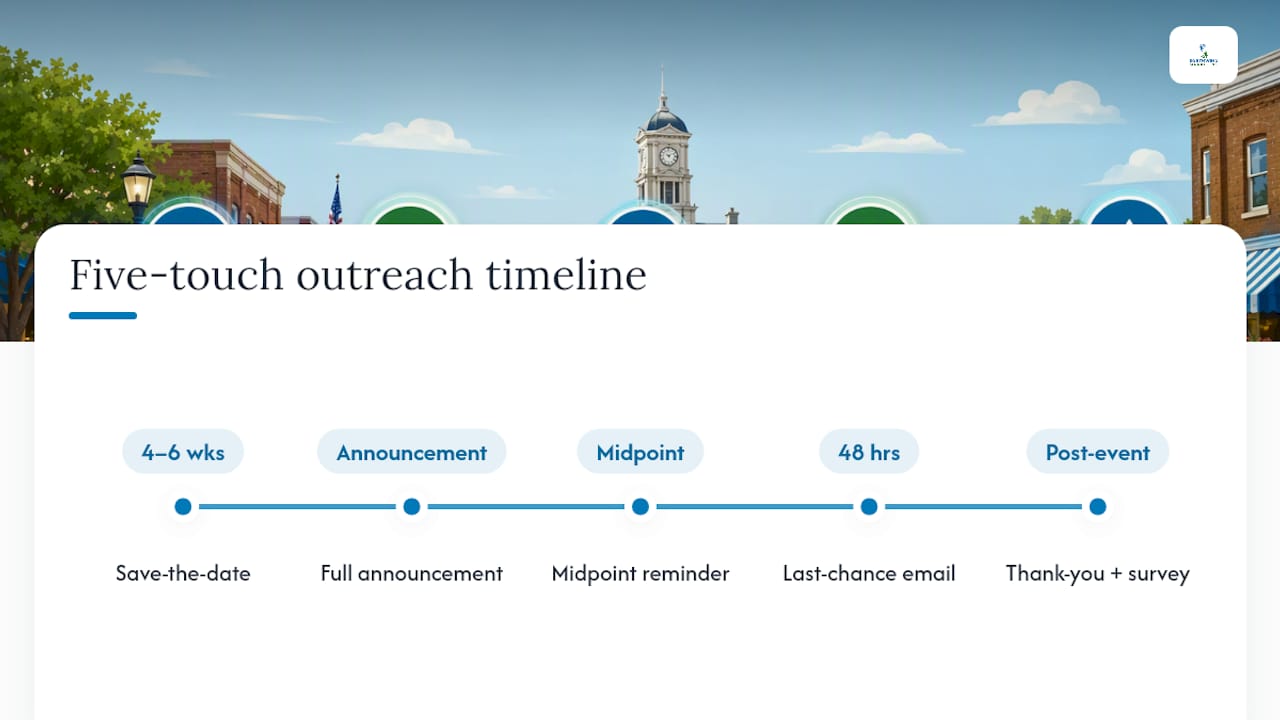
A simple five-touch sequence covers most events: a save-the-date four to six weeks out, a full announcement with details, a mid-point reminder, a last-chance email 48 hours before, and a post-event thank-you with a survey or next-year signup link.
Segment your list by audience: locals, out-of-town visitors, sponsors, and volunteers each need different messaging. Sponsors want to know reach and placement; volunteers need to shift times, not marketing copy. Tag every link with UTM parameters so you know which segment actually clicked through.
Automation handles the manual grind here. A platform like Southwind Connect℠ can trigger reminder sequences automatically once someone RSVPs, freeing your team from manually tracking who got which email.
How Do You Get Downtown Merchants and Sponsors to Help Promote?
Partners reshare more often when you remove the work from their plate. A partner kit that includes ready-made graphics, captions, and links measurably increases participation compared to simply asking someone to "share the flyer."
Make specific, low-friction asks:
- Share one pre-written post on their business page during the final week.
- Display a printed poster or A-frame sign in their window or on the sidewalk.
- Run a small offer tied to the event, like a discount for attendees who show a ticket.
Coordinate through a shared posting calendar and one document that holds the final event details. When five different businesses post five slightly different start times, you lose trust as fast as you gain awareness. Your chamber of commerce or downtown development authority is often the natural hub for holding that source-of-truth document.
Where Should You List Your Event Online?
Most community calendars want submissions at least 30 days ahead, and some tourism sites and chamber calendars require even more lead time for print or newsletter inclusion. Build a formatting checklist before you submit anywhere: consistent event name, dates, address, description length, and a link back to your canonical page.
If time is short, prioritize your city or chamber calendar, your tourism bureau's site, and any regional "things to do" aggregator with local traffic. Search for additional calendars specific to your state or region; many exist that don't show up until you look. Paid featured placements are worth it only when the calendar has genuine local traffic. Ask for view or click data before paying.
When Should You Run Paid Ads for a Downtown Event?
Paid ads work best as a layer on top of organic effort, not a replacement for it. Run a small awareness budget starting three to four weeks out, then shift spend toward conversion objectives (ticket clicks, RSVPs) in the final ten days.
Geo-targeting is where downtown events have an advantage over generic advertisers: target a radius around your venue, add neighboring towns your visitors typically drive in from, and build a lookalike audience from past ticket buyers if your ad platform allows it.
Keep creative simple: one clear image or short video, the date and location visible without zooming, and a single call to action. For small budgets, track cost per click to your event page and cost per completed RSVP as your core KPIs rather than impressions alone.
How Do You Track Whether Online Promotion Actually Worked?
Reach and impressions tell you who saw your content. They don't tell you who showed up. Use UTM-tagged links on every channel, unique discount or ticket codes per partner, and QR code check-ins at the door to connect specific channels to actual attendance.
Separate the two metric types in every report. Sponsors want to see both: the awareness numbers (impressions, reach, post engagement) and the attendance numbers (tickets sold by channel, on-site counts, conversion rate from click to check-in). A recap that only shows reach leaves your best argument for next year's sponsorship on the table.
Building a Repeatable System for Every Event
A single source-of-truth record should exist before any partner starts posting: exact event name, timezone-correct dates, address, parking and accessibility notes, ticket link, weather policy, and the canonical URL everyone links back to.
A sample six-week timeline: weeks one and two build the event page and partner kit; weeks three and four handle listings, Google Business posts, and early social; the final two weeks run partner spotlights, targeted ads, and daily social content. Services like Southwind Signal℠ and Southwind Guardian℠ support the page and search side of this workflow, while Southwind Connect℠ handles the reminder sequences.
How Does SMS and Mobile Marketing Fit Into Event Promotion?
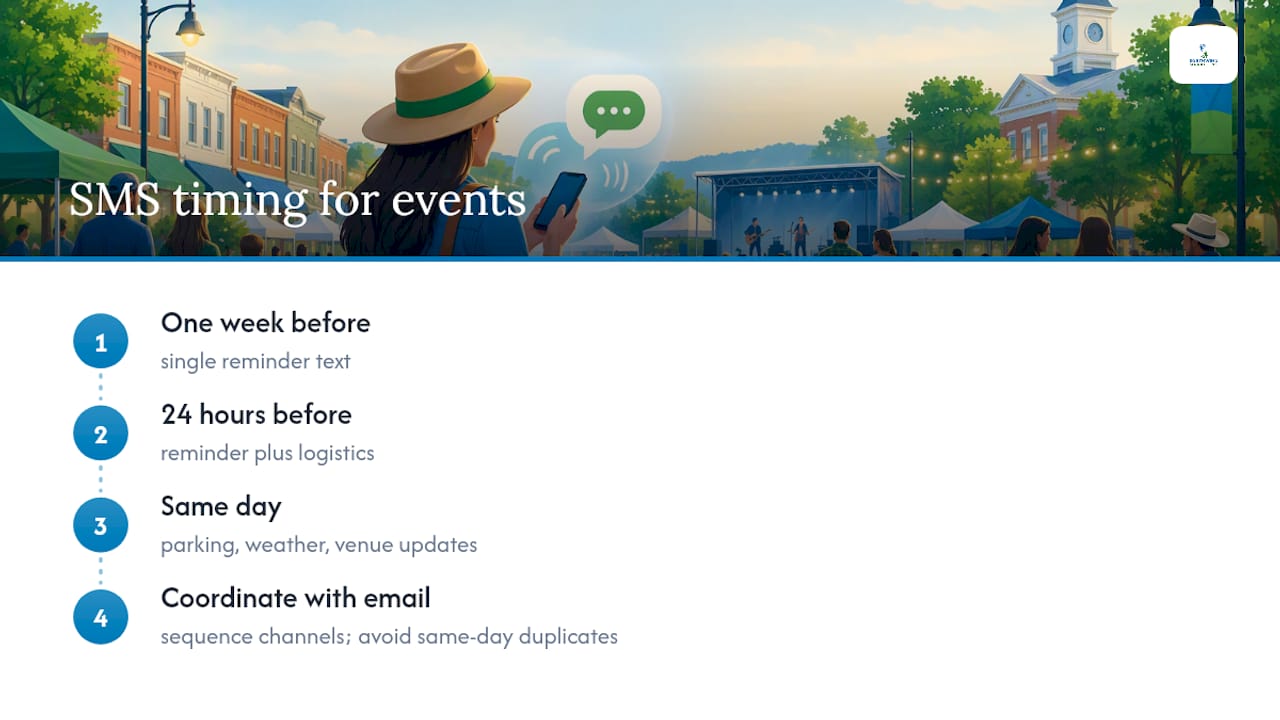
Text messages get opened at a rate no email or social post can match, which makes SMS one of the strongest tools for last-minute reminders and day-of logistics. The catch is that people need to opt in first, so build your list from your event page RSVP form, a sign-up box at a previous event, or a QR code on printed materials that leads to a simple text-to-join flow.
Use SMS sparingly and with purpose. A single text a week before the event, another 24 hours out, and a same-day message with parking or weather updates covers most needs without annoying subscribers into opting out. Save SMS for information people genuinely need in the moment, like a venue change or a delay, rather than routine promotional content better suited to email.
Mobile-first thinking extends past text messages, too. Most people finding your event will do it on a phone, so your event page needs to load fast and display cleanly on a small screen, with the ticket link and address visible without scrolling. A slow or cluttered mobile page loses people exactly when they're deciding whether to commit.
Coordinate SMS timing with your email sequence so subscribers aren't getting redundant messages on the same day through both channels. A CRM platform that handles multichannel messaging, like Southwind Connect℠, can sequence email and text together so reminders land on different days rather than piling up. Note that this kind of tool supports supplemental event communications; it is not a substitute for official emergency alert systems if severe weather or a safety issue affects your event.
Should You Work With Local Influencers for a Downtown Event?
Downtown events don't need a national influencer with six-figure followings. They need people with real, engaged local followings: the food blogger who covers your county, the parent account that posts about weekend activities, the college student whose Reels of downtown already get shared around town.
Reach out early, at least a month before the event, and offer something concrete: a free ticket, early access to interview a vendor, or a behind-the-scenes look at setup. Ask for one or two specific deliverables, like a Reel and a story post, rather than a vague "help us promote this."
Give them the same partner kit assets you'd give a sponsor, but let them make it their own. Audiences can tell the difference between an authentic local recommendation and a scripted ad read, and the authentic version performs better for actual foot traffic. A single well-placed local creator post, tagged with your event's location, often outperforms a paid ad aimed at the same radius, because it comes with built-in trust.
Track results the same way you'd track a partner share: a unique link or discount code tied to that specific person, so you know whether the collaboration actually moved tickets rather than just racking up likes.
How Do You Engage Local Online Communities and Forums?
Every downtown has a handful of digital gathering places where residents already talk about what's happening in town: a city or neighborhood Facebook group, a subreddit for the region, a Nextdoor thread, or a local forum tied to the newspaper or radio station. These groups often have more engaged, locally relevant members than your own social following.
Post as a helpful neighbor, not an advertiser. Most groups have rules against blatant self-promotion, so lead with information, like parking tips or a schedule, and let the event details follow naturally. Ask a genuine question sometimes, like requesting volunteer ideas or feedback on timing, since two-way engagement builds more goodwill than a one-way announcement ever will.
Identify the moderators or admins of these groups ahead of time and build a relationship before you need something from them. A moderator who already knows and trusts your organization is far more likely to approve your post promptly or even pin it.
Local online communities also serve as an informal early warning system. If people start asking questions in a group about parking, cost, or accessibility, that's a signal your event page is missing information those exact people need.
Can Contests and User-Generated Content Boost Turnout?
A well-run contest turns attendees into promoters without you writing a single extra post. The most effective version for downtown events asks people to post a photo from a past event, or a photo anticipating this year's event, tagged with your event hashtag and location, for a chance to win something small and locally sourced, like a gift card to a downtown restaurant.
Keep the entry mechanism simple. Requiring someone to follow three accounts, tag five friends, and share to their story creates friction that kills participation. One clear action, like posting with a specific hashtag, is easier to track and easier for people to actually do.
User-generated content compounds. Photos and videos from a previous year's event, shared by real attendees rather than the organizer's account, make the event feel established and worth attending again. Repost the best entries throughout your countdown period, with permission and credit, which also gives your partner kit fresh material without extra photography costs.
Pick a consistent, short hashtag and use it everywhere: your event page, your Google Business posts, your printed signage, and every social caption. A hashtag that changes year to year loses the archive of past content that makes a contest and its results easy to find later.
Is Your Online Event Promotion Accessible to Everyone?
Accessibility isn't a separate checklist item bolted onto the end of your promotion plan; it determines whether a meaningful share of your potential audience can actually find and use the information you're putting out. Every image posted to social media or used in your partner kit needs alt text describing what's in it, not just for screen reader users, but because Facebook and Instagram increasingly use that text for search and ranking too.
Video content, especially the Reels and day-of clips your social calendar relies on, needs captions. Many people watch social video with the sound off by default, and captions are the only way anyone who is deaf or hard of hearing gets the message at all. Most platforms now offer auto-caption tools; review them for accuracy rather than trusting them blindly, since misheard words in a caption can garble your event's name or address.
Your event landing page deserves the same attention. Sufficient color contrast, text that resizes without breaking the layout, and a logical heading structure help people with low vision or cognitive disabilities navigate the page with a screen reader or magnification tool. Include practical accessibility details in the event description itself: whether the venue has ramps or accessible parking, whether ASL interpretation will be available, and who to contact with accessibility questions before the event.
None of this is optional politeness. It's the difference between an event page that serves your whole downtown and one that quietly excludes part of it.
Practical Perspective: Small Budgets, Volunteer Teams, and Rural Realities
If you're running this with one volunteer and a shoestring budget, build the event page and partner kit first. Everything else amplifies those two. Show sponsors a simple early win, like ticket clicks by week two, and write down what worked. Next year's event should take half the effort.
— Damien Denmark
How Southwind Marketing Helps Downtowns Promote Events
Most downtown organizers we talk to aren't short on event ideas. They're short on the hours it takes to build a proper event page, keep a Google Business Profile current, and run reminder emails without dropping the ball. Southwind Marketing specializes in Rural America and small-town markets that bigger agencies tend to skip past, so the workflow above isn't theoretical to us.
We build the website and event landing pages with the structured data Google actually looks for, handle search visibility so your "near event" content shows up when visitors search for parking or restaurants, and set up CRM automation through Southwind Connect℠ so reminder sequences run themselves instead of eating a volunteer's Saturday. Plans start at $97 a month, with setup fees ranging from $99 to $799 depending on complexity, listed on the Southwind Connect℠ page. If your downtown, chamber, or Main Street program is planning next year's calendar of events, get in touch with our team to talk through what a discovery call would look like for your organization.
Sources
- Learn About Google Event Schema Markup | Google Search Central
- Create & manage posts on your Business Profile - Google Business Profile Help
- Downtown Program Fund Marketing Toolkit (City of Eugene)
- 2025 Event Promotion Trends Report
FAQ
What Are Some Effective Ways to Promote Events Online?
The most effective approach combines a canonical event page with structured data, Google Business Profile event posts, partner shares from local merchants, community calendar listings, and a coordinated email and social schedule. Organizers reporting the highest ROI point to email, organic social, and local partnerships ahead of paid ads.
What Is a Good Website to Promote Events On?
Your own event landing page, built with proper schema.org/Event structured data, should be the primary destination every other channel links back to. Community calendars and chamber or tourism sites are strong secondary listings, but they work best when they point traffic to your canonical page rather than replacing it.
Which Social Media Platform Is Best for Event Promotion?
There's no single best platform; most successful organizers run content across three to five platforms rather than relying on one. Trend data shows event marketers maintain 3 to 5 social platforms on average, pairing organic partner tagging with paid boosts on whichever platform their specific audience uses most.
What Do the "5 C's" Mean for Event Planning?
Definitions of the "5 C's" vary by source and aren't a fixed industry standard, so treat any version you encounter as one framework among several rather than a universal rule. The consistent themes across most versions are clarity of purpose, coordination among partners, communication timing, cost management, and check-in or conversion tracking, all of which this playbook already covers in more concrete terms.
How Much Does Southwind Marketing Charge for Event Marketing Support?
Pricing depends on which services you need, from a one-time event landing page to ongoing CRM automation. Current plans and setup fees are listed on the Southwind Connect℠ services page, and other service pricing is available by request through Southwind Marketing directly.