
The right CRM for small service businesses in 2026 balances three things: honest pricing, fast onboarding, and mobile tools your crew will actually use in the field. For most operators, that means starting with a right-sized platform like Southwind Connect℠, HubSpot CRM, or Pipedrive rather than an enterprise system built for a sales floor you don't have. Larger, multi-location teams planning heavy custom integrations should look further down the list toward Zoho CRM or SugarCRM instead.
TL;DR:
- Most small service businesses benefit from CRM systems with honest pricing, quick onboarding, and mobile tools tailored to fieldwork.
- Free or low-cost options like HubSpot and Zoho are popular starting points, but their features often have usage caps or limited offline functionality.
- A phased implementation involving data audit, core setup, automation, and advanced integrations reduces failure risks and improves adoption.
- Connectivity issues, staff size, and real workflow needs must inform CRM choice, prioritizing simplicity and offline capability for rural or small teams.
- Using a CRM implementation service can help small businesses ensure faster, smoother adoption and avoid software abandonment.
Table of Contents
- What Is the Best CRM Software for Service Providers?
- How Do These CRM Options Compare Side by Side?
- How Do You Choose the Right CRM for Your Team?
- What Does a Realistic CRM Rollout Timeline Look Like?
- What Rural Service Businesses Get Wrong About CRM Software
- Get a CRM Rollout That Actually Sticks
- Sources
- FAQ
What Is the Best CRM Software for Service Providers?
Picking a CRM software for service providers comes down to matching the tool to how your team actually works, not to which platform has the longest feature list. A plumbing outfit with four trucks needs scheduling, mobile notes, and payment tracking. A three-person bookkeeping firm needs simple contact records and reminders. Neither needs a system built for a 200-seat sales team.
Here's a shortlist worth your time, starting with the option built specifically for organizations like yours.
Southwind Connect℠. A CRM and automation platform built for chambers, small cities, and service-based organizations that need multichannel communication (SMS, email, and more) without hiring a dedicated IT department. It comes with managed implementation, meaning the provider's team sets up your workflows instead of leaving you to figure it out alone, and it includes an unlimited-seat pricing option for qualifying rural nonprofits. That last point matters more than it sounds. Most CRMs charge per user, which punishes small teams that want everyone (dispatch, technicians, and the office manager) logged in and working from the same customer record.
HubSpot CRM. The free tier is genuinely usable, not a stripped-down trial, and it scales into marketing and service hubs as you grow. Best for small teams that want an integrated stack without juggling separate tools for email campaigns and pipeline tracking.
Salesforce Starter. A scaled-down version of the platform most people associate with big enterprise budgets, with guided onboarding built for smaller teams. Best for a service business that expects to outgrow simple tools in a year or two and wants a system with room to grow into.
Zoho CRM. Loaded with built-in features (invoicing, inventory, social media monitoring) at prices that undercut most competitors. Best for budget-conscious owners who want more functionality baked in rather than bolted on through add-ons.
Pipedrive. Built around a visual sales pipeline that's about as close to "drag and drop" as CRM software gets. Best for sales-driven service businesses like contractors or consultants who live and die by tracking deals through stages.
Freshsales. Combines sales and service workflows with AI-assisted lead scoring built in. Best for teams that want smart prioritization of leads without configuring a separate automation tool.
Less Annoying CRM. The name is the pitch. It's a simple, low-cost system built specifically for small businesses that don't want a learning curve. Best for very small teams (a solo operator or a two-person office) who need contact management and nothing more.
Monday CRM. Built on the same visual, board-based interface as Monday's project management tool, which makes it intuitive for teams already using Monday for scheduling or task tracking.
Insightly CRM. Pairs CRM functionality with project management, useful for service businesses that manage ongoing client projects rather than one-off jobs.
SugarCRM. A more customizable, mid-market platform for service businesses with complex workflows or multiple departments that need tailored automation.
Bitrix24. Bundles CRM with communication tools (chat, video calls, document sharing) in one workspace, appealing to teams that want fewer logins across their day.
EngageBay. Combines CRM, marketing automation, and helpdesk features at a price point aimed squarely at small businesses stretching a tight budget.
Apptivo. A modular suite where you pick and pay for the apps you need (invoicing, CRM, project tracking) instead of one fixed package.
Pipeline. A straightforward, pipeline-first CRM aimed at small sales teams that want simplicity over a sprawling feature set.
Roughly 38% of small and midsize business buyers start on a free or freemium CRM tier before scaling up, which tells you something: the smart move is rarely to buy the most powerful system on day one. It's to buy the system your team will open every morning.
How Do These CRM Options Compare Side by Side?
The differences that matter most for a service business rarely show up in a features list. They show up when a technician is standing in someone's driveway trying to log a job on a phone with two bars of signal. Here's how the shortlist stacks up on the dimensions that actually affect daily use.
A few things stand out once you line these up:
- Free and freemium tiers are common, but "free" almost always means capped users, contacts, or automation, so check the ceiling before you build a workflow around it, especially when you use AI for small business to extend your CRM capabilities with automation and follow-up generation.
- Mobile quality varies more than marketing pages admit. Field service teams that rely on mobile CRM access need to test offline functionality specifically, not just whether an app exists.
- Sales-pipeline tools like Pipedrive and Pipeline suit businesses selling recurring contracts (landscaping, security, consulting). Project-based tools like Insightly fit businesses managing multi-week jobs.
- Platforms with built-in communication (Bitrix24, EngageBay) cut down on app switching but can feel cluttered if you only need contact records and reminders.
- Confirm integration with your existing scheduling and payment tools before committing. Scheduling and payment integrations matter more to service businesses than CRM-native marketing modules, yet vendors tend to lead with marketing features in demos.
How Do You Choose the Right CRM for Your Team?
Start with a requirements document, not a vendor comparison chart. Write down, in plain language, what a job actually looks like from first contact to invoice paid. Where does the schedule live now? How do technicians take notes in the field? How does payment get collected and recorded? A CRM that doesn't map onto that real workflow will get abandoned within a few months, no matter how good its feature list looks on a sales call.
From there, sort your needs into two columns.
- Must-haves: contact and job history in one place, mobile access that works with weak signal, calendar or scheduling sync, and basic automated follow-up (appointment reminders, review requests).
- Nice-to-haves: built-in payment processing, AI-assisted lead scoring, marketing email campaigns, and advanced reporting dashboards.
Anything in the nice-to-have column that a vendor insists you need immediately is usually a sign they're selling you their most expensive tier, not solving your problem.
When you get on a demo call, ask these questions directly:
- What does data migration from our current system (spreadsheet, another CRM, paper) actually involve, and how long does it take?
- What happens when the internet connection drops in the field? Does the mobile app queue data locally, or does it lose the entry?
- What's included in onboarding, and what costs extra after the first 30 days?
- Can we assign role-based permissions so a technician sees different information than the office manager?
- What does support look like after the sale, phone, chat, or a ticket queue with a multi-day response time?
Red flags to watch for: vague answers about data ownership, pricing that requires a sales call to disclose, and any vendor that can't clearly explain what happens to your data if you cancel.
Pro Tip: Run a 30-day pilot with your two busiest employees before rolling a CRM out to the whole team. If they won't use it voluntarily, a mandate won't fix that. It'll just create workarounds in group texts and sticky notes.
Factor total cost of ownership beyond the sticker price: training time, any per-user fees that creep up as you hire, and the cost of a data migration if you switch systems again in two years. CRM ROI tends to run positive within the first 12 months when adoption is strong, with a commonly cited benchmark of roughly $3.10 returned for every dollar spent. That number depends entirely on whether your team actually uses the system daily.
What Does a Realistic CRM Rollout Timeline Look Like?
Roughly a significant portion of CRM implementations fail to hit their original goals, and the research on this is consistent: the failures are almost never about the software itself. They come down to messy data, skipped training, and rollouts that try to do everything at once. A phased approach fixes most of that.
Phase 1 (weeks 1 to 4): core setup. Import contacts, build your pipeline stages, and get the whole team logging basic job and customer data. Nothing fancy yet, just consistent habits.
Phase 2 (weeks 5 to 10): automation and reporting. Turn on appointment reminders, follow-up sequences, and the reports that actually inform decisions, like which service lines generate repeat business.
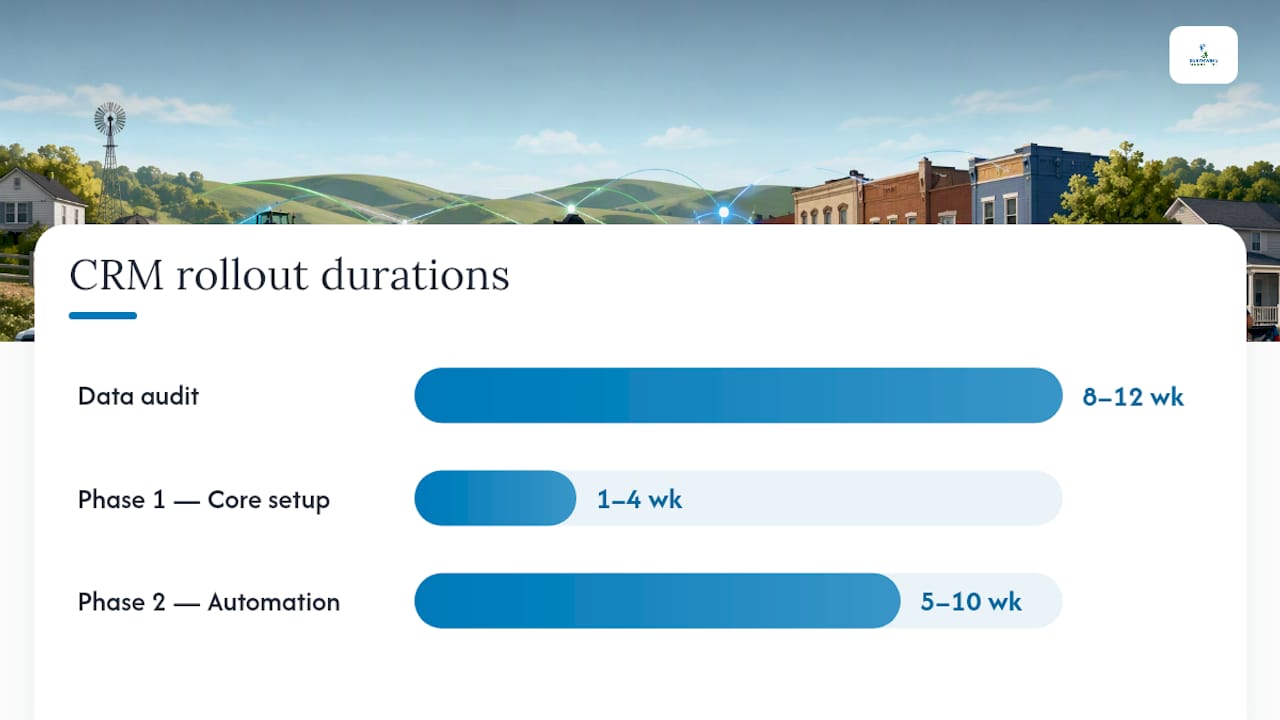
Phase 3 (month 3 and beyond): advanced integrations. Connect payment processors, scheduling tools, and any analytics dashboards once the team is comfortable with daily use.
Before any of that, run a data audit. Small service businesses often carry years of contact information across spreadsheets, sticky notes, and an old system nobody trusts anymore. Cleaning and standardizing that data typically takes 8 to 12 weeks for a business with a real customer history, and skipping this step is one of the fastest ways to end up with a CRM full of duplicate entries and dead phone numbers within six months.
- Audit existing contact and job records for duplicates, missing fields, and outdated information.
- Decide what data actually needs to migrate versus what gets archived.
- Set governance rules early: who owns data entry, and what "done" looks like for a customer record.
- Budget a portion of your total implementation cost for training and change management, not just software licensing.
- Revisit adoption at 30, 60, and 90 days, and fix friction points instead of assuming the team will adapt on its own.
If your team is small and stretched thin already, hiring an implementation partner to run this roadmap is often cheaper than the staff hours lost to a stalled rollout. A CRM implementation and selection service handles the audit, migration, and phased training so the CRM gets used, not shelved.
What Rural Service Businesses Get Wrong About CRM Software
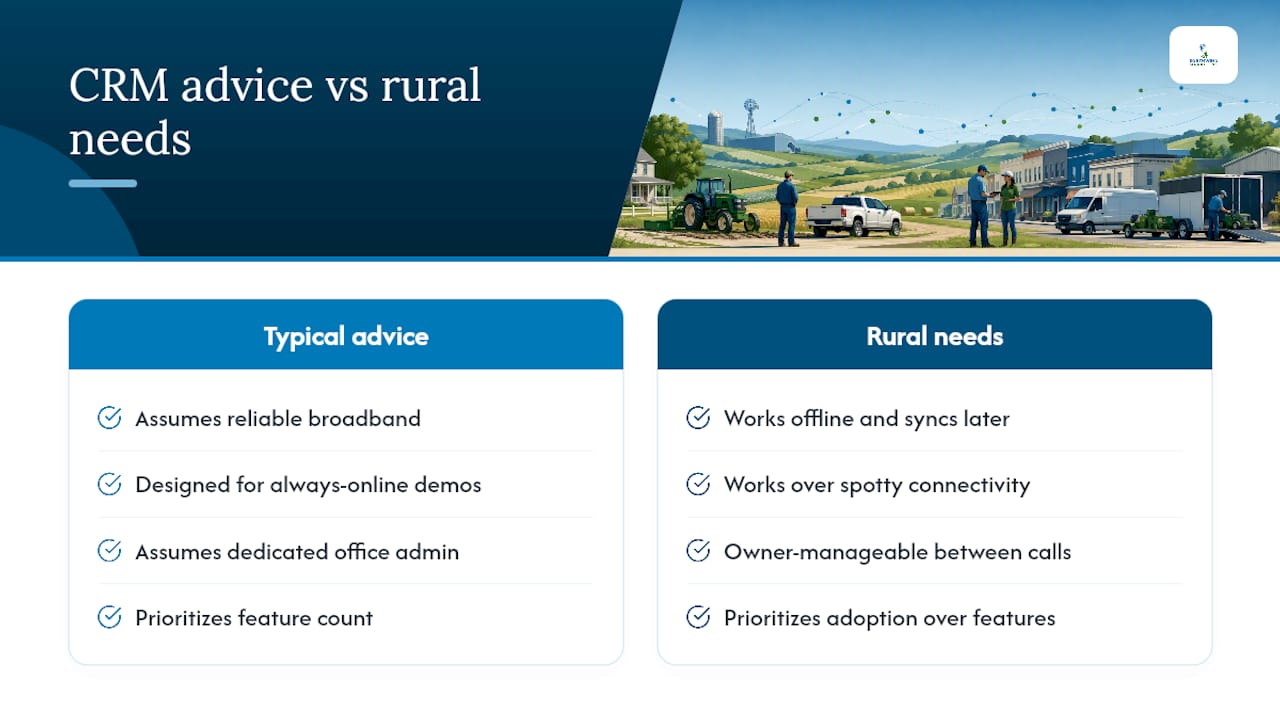
Most CRM advice assumes reliable broadband and a dedicated office manager who lives in the software all day. That's not the reality for a lot of the service businesses Southwind Marketing works with across small towns and rural counties. Connectivity gaps mean mobile CRM tools need to work offline and sync later, not just look good in a demo with a strong Wi-Fi signal.
The bigger issue is staffing. A five-person HVAC company doesn't have a systems administrator, so the CRM has to be simple enough that the owner can manage it between service calls. That's why Southwind prioritizes adoption over feature count in every rollout, whether it's a chamber tracking member renewals or a contractor managing a job pipeline. A CRM nobody opens is worth less than a spreadsheet somebody actually updates. Right-sizing the tool to the team's real bandwidth, not the vendor's biggest package, is what makes the difference between software that gets used and software that gets quietly abandoned by month three.
— Damien Denmark
Get a CRM Rollout That Actually Sticks
Most of the CRM options on this list work fine as software. The gap is almost always in setup, training, and whether the tool fits how your team actually works in the field, not just in a demo. This is an alternative to buying a CRM off a website and figuring it out alone: a CRM implementation and selection service handles the data audit, phased rollout, and training plan so adoption happens in weeks, not never.
This works especially well for chambers of commerce, rural service businesses, and small agencies that don't have a spare staff member to become the in-house CRM expert. Southwind Connect℠, a CRM and automation platform, is built specifically for organizations like these, with multichannel communication and an unlimited-seat pricing option for qualifying rural nonprofits. Expect a discovery call to map your workflows, a rollout timeline tailored to your team's size, and a straightforward cost range before you commit to anything. If you want a CRM that's actually running by spring instead of half-configured in a drawer, request a proposal and get a real timeline back within days.
Sources
FAQ
What Is the Most Popular CRM for Small Businesses?
HubSpot CRM and Zoho CRM are among the most widely adopted options due to their free and low-cost tiers, though the "best" choice depends on whether your business needs sales pipeline tools, field service features, or managed implementation like Southwind Connect℠ offers.
How Much Does a CRM Cost for a Small Business?
Costs range from free (limited-feature tiers) to $20 to $100 or more per user per month for paid plans, plus implementation and training costs that often run 15 to 20% of the total project budget.
Is There a Free CRM for Small Businesses?
Yes. HubSpot CRM, Zoho CRM, and several other platforms on this list offer usable free tiers, and about 38% of small business buyers start on a free or freemium plan before upgrading as their needs grow.
Which CRM Is Beginner Friendly?
Less Annoying CRM and Pipedrive are built around minimal setup and simple visual pipelines, making them easy starting points, while Southwind Connect℠ pairs an approachable interface with managed implementation for teams that want hands-on help getting started.