
The right CRM for small service based businesses is not the one with the most features. It is the one that captures a missed call, texts the caller back in seconds, and books the job before your competitor's phone even rings. For most contractors, salons, and repair shops, that means an integrated CRM with missed-call text back and online booking, or a managed setup like Southwind Connect starting at $97 a month. Either way, the payoff is fewer no-shows and fewer jobs that walk to someone else.
TL;DR:
- Small service businesses should prioritize CRMs that automatically text back missed calls and integrate online booking to reduce lost leads and no-shows.
- Core features to look for include unified contact and job records, shared messaging inboxes, and simple, calendar-based booking systems.
- Managed CRM setups like Southwind Connect offer faster implementation, ongoing support, and a flat monthly fee starting at $97, unlike piecing together multiple apps.
- Pilot programs tracking missed calls, auto-text response rates, reply times, and booked jobs help validate automation ROI before full deployment.
- Ensuring customer data security and compliance, along with support for non-technical staff, is crucial for sustained adoption and trust.
Table of Contents
- Why Unanswered Calls Are Costing Service Businesses Jobs
- Core CRM Features Small Service Businesses Actually Need
- How Do You Choose the Right CRM or Implementation Partner?
- What Does a Missed-Call Text Back and Booking Pilot Look Like?
- Is Customer Data Safe in a Small Business CRM?
- Do CRM Providers Offer Support and Training for Small Teams?
- Why a Managed CRM Setup Usually Beats a Patchwork of Tools
- Southwind Connect: A Practical CRM Built for Small Service Teams
- Sources
- FAQ
Why Unanswered Calls Are Costing Service Businesses Jobs
A ringing phone that nobody picks up is not a minor inconvenience. It is a lead walking out the door, and for service businesses it happens more often than most owners realize.
Home services businesses miss a significant share of their inbound calls, according to platform data from Neuron HQ. Fewer than 3% of those callers bother leaving a voicemail. Think about what that means in practice: a plumber under a sink, a stylist mid-color, a mechanic with his hands in an engine bay, all missing calls at almost the same rate, and almost none of those callers are willing to wait for a callback that might never come.
That behavior makes sense once you think about how people actually search for services. Someone with a leaking water heater or a broken car doesn't call one business and wait. They call the first three or four results on their phone, and whoever answers first, or responds fastest, gets the job. A missed call rarely means the customer gives up. It means they moved on to the next name on the list.
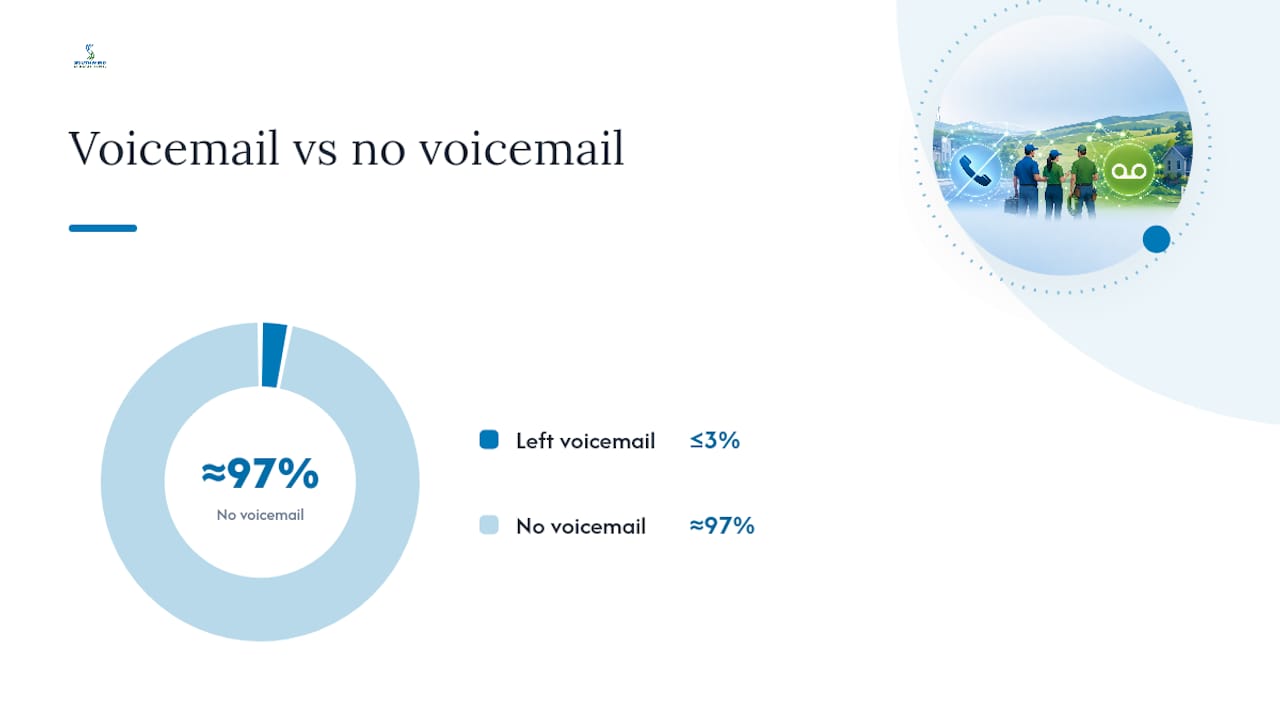
Statistic to remember: With high unanswered-call rates and very low voicemail follow-through, a service business fielding a typical volume of calls each week could be losing contact with several potential customers before they ever speak to a human.
The businesses most exposed to this problem share a common trait: their most valuable employees are also the people who would normally answer the phone.
- A contractor on a roof or in a crawlspace cannot glance at caller ID, let alone hold a conversation.
- A stylist with a client in the chair is not going to step away mid-service to take a call.
- A repair shop technician with grease on his hands is not stopping to explain pricing over the phone.
- A one-person landscaping or cleaning business has nobody else to catch the call at all.
This is exactly the gap that missed-call text back and online booking calendars are built to close. Instead of losing the lead to silence, the system sends an automatic text within seconds of the missed call, keeps the conversation open, and routes the reply somewhere a real person will see it. The goal isn't to replace the phone call. It's to buy enough time to bring the customer back before they call the next name on their list.
Core CRM Features Small Service Businesses Actually Need
Not every CRM feature matters equally for a five-person service business. Some are genuinely load-bearing. Others are extras that look good in a sales demo and then sit unused. Here's what actually moves the needle, ranked by how directly it prevents lost revenue.
- Contact and job records tied together. A customer's name, phone number, service history, and current job status should live in one record, not scattered across a notebook, a spreadsheet, and three different phones. When a repeat customer calls, whoever answers should see their last job, what they paid, and any notes from the previous visit, instantly.
- Missed-call text back and a shared messaging inbox. This is the single highest-leverage feature for speed-to-lead. The system catches every unanswered call and fires off a text automatically, and every reply lands in one inbox the whole team can see, not buried on one employee's personal phone.
- Online booking with calendar and staff rules. Customers increasingly expect to book without a phone call at all. A booking calendar that respects your actual availability, by technician, location, or service type, prevents double-booking and cuts down on the back-and-forth of manual scheduling.
- Mobile access with offline capability. Your team is in trucks, on job sites, and in basements with no signal. A CRM that only works from a desktop is a CRM half your staff will never open.
- Simple invoicing and payment capture. The ability to send an invoice, take a card payment, or sync with your accounting software from the same tool that scheduled the job removes an entire layer of manual paperwork.
- Automated routing, reminders, and follow-up. New leads get routed to the right person automatically, appointment reminders go out without anyone remembering to send them, and follow-up messages fire after a job is completed.
- Basic reporting. You don't need a data science department. You need to know how many leads came in, how many turned into booked jobs, and where the drop-off is happening.
Pro Tip: If a CRM demo spends more time on dashboards and analytics than on how fast it can text back a missed call, that's a signal the vendor is solving a different problem than yours.
Notice what's missing from that list: nothing about AI chatbots, nothing about complex sales pipelines with a dozen stages, nothing about enterprise-grade customization. Small service businesses run on speed and follow-through, not sophistication. A CRM built specifically for small service businesses should reflect that, prioritizing the handful of features above over a long feature list that mostly goes unused.
How Do You Choose the Right CRM or Implementation Partner?
Choosing a CRM is less about comparing spec sheets and more about figuring out who will actually make the thing work for your team. A tool with perfect features and no support behind it is often worse than a simpler tool with real onboarding help.
Start with these selection criteria before you look at a single price tag:
- Ease of use for non-technical staff. If your office manager or a part-time receptionist can't learn the core functions in an afternoon, adoption will stall.
- Native SMS and phone support, not a bolted-on integration that requires a separate app or subscription.
- Booking and scheduling built in, not sold as a $30-a-month add-on from a different company.
- A pricing model that scales with your team, not one that punishes you for adding a second technician or a seasonal hire.
- Real onboarding support, whether that's from an in-house customer success team or a managed implementation partner.
When you sit down for a demo, ask direct questions instead of nodding along to a feature tour:
- Who owns the customer data if we cancel, and can we export it?
- What does SMS actually cost per message, and is there a monthly cap?
- Can we port our existing business number, and how long does that take?
- How long does a realistic onboarding take for a team our size?
- Does this connect to the accounting and payment tools we already use?
A few answers should send you looking elsewhere. Hidden fees buried in the fine print, a mobile app that clearly wasn't tested by anyone who works in the field, and no shared inbox for text replies are all red flags. If customer messages land on one person's personal phone with no backup, you've built a single point of failure into your lead flow.
The safest path is a three-step rollout: test the core features with your own real scenarios during a trial, pilot the system on one location or for one week with a single technician, then roll it out to the full team once you've seen it work. Southwind Marketing's CRM implementation process follows this same logic, because skipping the pilot step is how most CRM rollouts fail quietly six months in.
What Does a Missed-Call Text Back and Booking Pilot Look Like?
Talking about missed-call text back in theory is easy. Running it correctly is where most small businesses either see it pay for itself in the first month or abandon it after a confusing false start.
The mechanics matter more than people expect. A missed-call text back system detects an unanswered call, checks it against a set of filters, and then sends an automated text from your business number, within seconds, according to Omnifox's guide to missed-call text back. Those filters matter: the system should only text mobile numbers, ignore calls shorter than a few seconds (usually hang-ups or wrong numbers), and suppress repeat texts to known spam callers so you're not annoying legitimate customers with rate-capped, repeated messages.
The message itself has a formula that works better than anything clever. Identify the business by name, acknowledge the missed call, ask exactly one question, and set a clear expectation for what happens next. Omnifox's research on message performance backs this up directly: short, service-focused texts following that pattern outperform longer or promotional messages, and keep opt-outs near zero. A text that says "Hey, this is Miller's HVAC, sorry we missed you! What's going on with your system today? We'll text you right back" does more work than a paragraph of marketing copy.
Booking calendars follow a similar logic. According to guidance on booking automation for service businesses, an effective self-booking flow shows real, live availability, collects the intake information you actually need (address, service type, and for trades, ideally a photo of the problem), sends automatic confirmations and reminders, and can even collect a deposit at the time of booking. Vendors report meaningful gains from this kind of automation. One booking automation guide cites reported increases of up to 61% more appointments after adding reminder sequences, alongside significant weekly time savings for the staff who used to chase confirmations by phone.
If you're running a pilot, track these numbers over two to four weeks:
| Metric | What it tells you |
|---|---|
| Missed calls detected | Baseline volume of calls slipping through |
| Auto-texts sent | How many of those calls the system actually caught |
| Reply rate | Whether your message content is working |
| Median time to human reply | How fast your team closes the loop once a customer responds |
| Conversations converted to booked jobs | The real ROI number |
| Revenue tied to recovered jobs | Whether the tool pays for itself |
Run a two-week baseline before turning automations on, then compare the tracked pilot period against it, a method backed by Omnifox's own pilot approach. That comparison is what actually proves the tool worked, rather than just assuming it did.
In a managed implementation, the division of labor is straightforward. Southwind Marketing configures the filters, writes the initial message templates, connects the booking calendar to your actual staff availability, and sets up the shared inbox so replies never land in a black hole. The business owner or receptionist's job is simpler: respond to the conversations the system surfaces, and adjust the message wording once you've heard how real customers respond to it.
Pro Tip: Every automated reply needs somewhere to land that someone actually checks. A text-back system that dumps replies into an unmonitored inbox wastes the entire effort, so confirm ownership of that inbox before you launch anything.
Is Customer Data Safe in a Small Business CRM?
Data security is not just an enterprise concern. A small service business holding customer names, addresses, phone numbers, and payment details is holding exactly the kind of information bad actors want, and a breach can do real damage to a business that runs on local trust.
Look for a CRM that encrypts data both in transit and at rest, offers role-based access so a part-time scheduler doesn't have the same permissions as the owner, and stores payment information through a compliant processor rather than in a plain text field. Ask directly whether the provider is PCI compliant if you're taking card payments through the system, and whether they carry cyber liability coverage of their own.
Data ownership deserves a direct answer, not a vague one. If you ever switch providers, you should be able to export your full customer list, job history, and message logs without a fight. A vendor that makes data export difficult or expensive is signaling how they think about your relationship long before you ever need to leave.
Privacy also means being deliberate about SMS communication. Customers who reply to a missed-call text should be able to opt out easily, and that opt-out should actually stop future messages, not just the automated ones. A CRM with automation baked in should make compliance with these basics automatic, not something you have to configure by hand every time.
Do CRM Providers Offer Support and Training for Small Teams?
Support quality varies enormously between CRM providers, and it's one of the most underrated factors in whether a system actually gets used six months after signup. A tool nobody was trained to use properly ends up half-adopted, with staff falling back on old habits within weeks.
The best providers for small service businesses offer live onboarding, not just a library of help articles. That typically means a real person walking your team through setup, configuring your specific booking rules and message templates, and being reachable by phone or chat when something breaks, not just email with a 48-hour response window.
Training resources matter more for the non-technical staff who will use the system daily than for the owner who picked it. A receptionist or part-time scheduler needs a short, practical walkthrough, not a 40-page manual. Look for providers who offer role-specific training, recorded video walkthroughs for common tasks, and a direct line for questions during the first few weeks after launch, when adoption problems tend to surface.
Managed implementation partners close this gap further by handling the technical setup entirely, then training your team on the day-to-day use rather than the back-end configuration. That division, someone else handles the plumbing, your team learns the parts they'll actually touch, is often the difference between a CRM that sticks and one that quietly gets abandoned.
Why a Managed CRM Setup Usually Beats a Patchwork of Tools
The DIY instinct is understandable. A booking widget here, a separate texting app there, a spreadsheet holding it all together, it feels cheaper on paper. In practice, stitching together four or five point tools creates its own hidden costs: integration breakage when one app updates and another doesn't, no single place to see the full customer conversation, and hours spent troubleshooting connections that a unified system would have handled automatically.
The maintenance burden is the part people underestimate most. Someone has to notice when the booking widget stops syncing with the calendar, or when a texting app changes its API and the missed-call trigger quietly stops firing. In a five-person business, that someone is usually the owner, at 9 p.m., after the shop has closed.
A managed setup shortens the distance between signing up and seeing results. Instead of spending weeks configuring integrations yourself, a partner who has done this dozens of times sets the filters, writes the first message templates, and connects the calendar in days, then trains your team on the parts they'll actually use. That matters more in rural and small-town markets, where hiring a dedicated office manager just to run software isn't realistic for most budgets.
None of that means a DIY approach is wrong for everyone. A single-person operation with real technical comfort and a genuinely tight budget can piece together a workable system, and tools like a Google Sheets based CRM can carry a solo operator further than people expect. But once you have two or more people answering calls, or a booking volume that makes a spreadsheet unreliable, the math tips toward a managed system. The time saved on maintenance alone usually outweighs the monthly cost.
— Damien Denmark
Southwind Connect: A Practical CRM Built for Small Service Teams
If you've read this far, you already know what matters: catching missed calls fast, keeping bookings organized, and doing it without hiring someone new just to answer the phone. That's exactly what Southwind Connect℠ is built to do.
Southwind Connect gives small service businesses missed-call text back, a shared messaging inbox, booking and calendar integration, and automated follow-up in one system, with hands-on setup from Southwind Marketing instead of a self-service dashboard you're left to figure out alone. Plans start at $97 a month with unlimited seats included, allowing your entire team to have access without additional per-user fees as you grow. That pricing structure alone sets it apart from CRMs that charge per seat, where adding a second or third employee quietly doubles your monthly bill.
It fits best for teams who are done losing jobs to unanswered calls and don't have the bandwidth to babysit a patchwork of apps. Start with a pilot on your busiest phone line or one location, watch the reply rate and booked jobs for two to four weeks, then decide on a full rollout. Request a demo or check current Southwind Connect pricing and plans to see what a working setup looks like for a business your size.
Sources
The call and voicemail figures in this article come from Neuron HQ's missed-call cost data, and the messaging and pilot methodology draws on Omnifox's missed-call text back guide. Booking automation outcomes reference AI-Automated's appointment booking guide and SMBautomation's self-booking guidance, with automation-and-human-touch framing from IBM's customer service automation resource.
For implementation help, Southwind Marketing's CRM implementation services and CRM for small service businesses guide cover setup in more depth.
FAQ
Which CRM Is Best for a Small Service Business?
The best fit is a CRM that combines contact and job records, online booking, and missed-call text back in one system, since those three features address where small service businesses actually lose revenue. A managed option like Southwind Connect works well for teams that want this running quickly without a long DIY setup process.
How Much Does a CRM Cost for a Small Business?
Costs vary widely depending on features and support level, but a managed system with missed-call text back, booking, and unlimited seats can start around $97 a month, as with Southwind Connect's pricing. Standalone missed-call text back tools alone often run in the $15 to $75 monthly range, according to Bennin Systems, depending on call volume.
Is There a Free CRM for Small Businesses?
Some general-purpose CRMs offer limited free tiers, but they rarely include native SMS, missed-call text back, or booking automation built for service businesses. A DIY option like a spreadsheet-based system can work at very small scale, but most service businesses outgrow that quickly once call volume or staff size increases.
Which CRM Is Beginner Friendly?
A CRM built specifically for service businesses tends to be easier for beginners than a general sales-focused platform, since it skips complex pipeline stages your team doesn't need. Look for one with hands-on onboarding and training included, since guided setup matters more for adoption than the interface alone.