
A Chamber Website Scorecard is a focused audit that scores your site on accessibility, mobile performance, SEO, membership and events functions, CMS usability, and hosting reliability. It exists to catch the gaps that cost you members and expose you to ADA complaints before a redesign vendor finds them for you. Run it yourself this week, or attach it to your next RFP.
TL;DR:
A chamber website scorecard evaluates eight areas, with priority given to accessibility, mobile performance, and member-facing functions over aesthetics.
Running the scorecard usually takes one to three days using staff, combining automated scans and manual checks of user journeys and accessibility features.
Hosting quality, including daily backups, SSL renewal, and uptime monitoring, is critical to ensure site reliability and quick recovery after issues.
Subdomain hosting for directories hampers search visibility, so a subdirectory structure is recommended to benefit from your site’s domain authority.
Chambers should require vendors to provide live staging demos, evidence of accessibility testing, and clear maintenance plans when considering proposals.
Table of Contents
What Goes Into a Chamber Website Scorecard
A useful scorecard scores eight areas on a simple 0 to 3 rubric: 0 means broken or missing, 1 means present but flawed, 2 means functional, and 3 means it works the way a member or visitor expects on the first try. Score each item, note the evidence (a screenshot, a URL, a timestamp), and you have something you can hand to a board or a vendor without an argument.
The categories that matter most:
Site identity and homepage clarity — Can a first-time visitor tell what your chamber does and who it serves within five seconds?
Contact information — Is a phone number, address, and staff directory reachable in two clicks or less?
WCAG basics — Headings, alt text, contrast, keyboard navigation, and labeled forms.
Mobile performance — Load speed and layout on a phone, not just a desktop monitor.
Events and directory functionality — Can someone find a member business or register for an event without calling the office?
CMS editing — Can your own staff update a page without submitting a ticket?
Hosting and backup posture — Is there a real recovery plan if the site goes down?
Once scored, sort by risk, not by what looks easiest to fix. A failing WCAG score or a broken event registration form outranks a stale color palette every time.
| Priority Level | Example Failures | Action Window |
|---|---|---|
| Immediate | Missing alt text, no keyboard navigation, broken registration form | Within a few weeks |
| High | Slow mobile load, subdomain-hosted directory, no CMS access for staff | Several weeks to a few months |
| Moderate | Outdated design, thin content, missing schema | Next budget cycle |
If you want a deeper, item-level version of this exercise, The 2026 Chamber Website Checklist breaks the same categories into 27 specific line items.
How Do You Run This Scorecard Yourself?
You don’t need a developer to complete a first pass. Most chambers can finish this in one to three days with staff they already have.
Run a quick automated crawl. A free scanner catches broken links, missing meta tags, and glaring accessibility gaps in minutes. BabyLoveGrowth’s AI SEO audit tool is a fast way to get a baseline crawl report before you go deeper.
Do manual accessibility spot checks. Tab through your homepage using only the keyboard. Try your event registration form with a screen reader if you have access to one.
Walk through real user journeys. Time yourself finding a member business in your directory. Time yourself registering for an event. If it takes you more than 90 seconds, a visitor will give up sooner.
Review your hosting report. Ask your current host for the last backup date, uptime log, and patch history.
Assign the accessibility checks to whoever handles communications, the hosting review to your IT contact or host, and the user-journey tests to a staff member who has never touched the CMS before, since they’ll notice what a familiar user won’t.
Pro Tip: If you send this scorecard to a vendor instead of running it internally, ask for the completed rubric back as part of the proposal, not just a verbal summary. A vendor who won’t show you the evidence isn’t ready to fix it.
What Accessibility Standards Actually Apply to Chamber Sites?
Chambers of commerce are generally private nonprofits, but many partner closely with city or county government, share hosting with public entities, or receive public funding, and that changes the compliance picture. Federal ADA guidance lays out the technical practices every organization should follow regardless of legal status: labeled forms, sufficient color contrast, keyboard-navigable menus, captioned video, and descriptive alt text on every meaningful image.
If your chamber’s site is hosted or co-branded with a municipal government, the stakes rise. The 2024 ADA web rule requires state and local government web content to meet WCAG 2.1 Level AA, with compliance deadlines phased in after the rule’s April 24, 2024 publication based on population size.
Check these items manually, not just with a scanner:
Every image carries alt text that describes its purpose, not just its filename.
Text and background colors meet a 4.5:1 contrast ratio at minimum.
Every interactive element is reachable and operable by keyboard alone.
Forms have visible, programmatically linked labels, not just placeholder text.
Video content includes captions.
Automated checkers catch maybe half of what matters. They miss focus traps, illogical tab order, and screen reader confusion that only a human tester finds. The Arvada Chamber added an accessibility profile tool to its site and reported measurable engagement gains, a reminder that accessibility fixes aren’t just legal cover. They keep people on your site longer.
Why Directory Hosting Location Affects Member Visibility
Where you host your member directory matters more than most chambers realize. Search engines often treat a subdomain like directory.yourchamber.com as a separate site from your main domain, which means it starts from zero and never fully benefits from your chamber’s existing authority. A subdirectory structure like yourchamber.com/directory keeps every member listing under the umbrella of your main site’s ranking strength.
This isn’t a cosmetic choice. Many chamber platform vendors default to subdomains because it fits their own business model, not because it serves your members’ search visibility. If your directory sits on a subdomain today, ask your next vendor to migrate it.
Beyond directory structure, run these checks:
Confirm your Homepage, About, and Contact pages act as clear “source of truth” pages that AI tools and search engines can pull from directly, an approach entity SEO for chamber-type organizations covers in more depth.
Test crawlability with a free tool to confirm search engines can index your event and member pages.
Check for duplicate or conflicting canonical tags, a common issue on older chamber CMS platforms.
Add basic schema markup for your organization, events, and local business listings.
Our guide on chamber of commerce SEO covers how these technical details translate into members actually finding you.
What Should You Require From a Chamber Website Host?
Hosting is where a lot of chamber sites quietly fail. A site can look polished and still sit on a server with no real backup plan.
Score these essentials:
SSL certificate active and renewing automatically.
Backups running daily, stored off-server, with a documented recovery time.
A staging environment where updates get tested before they go live.
Uptime monitoring with alerts, not just a promise.
A documented patch and plugin update schedule.
Maintenance beyond hosting matters just as much: accessibility regression testing after every content update, regular plugin audits, and performance tuning as your site grows. When you interview a host or vendor, ask directly: how often do you back up, what’s your recovery time if the site goes down, and do you retest accessibility after updates? Southwind Guardian℠ exists because most small chambers don’t have IT staff to chase these answers themselves.
Pro Tip: Ask any prospective host to show you a real recovery, not describe one. If they can’t restore a backup in a demo within a few minutes, they don’t have the process they’re claiming.
How Do You Prioritize Fixes on a Small Budget?
Fix in this order: legal and safety risk first, member-facing functions second, design polish last. An inaccessible registration form costs you more, in complaint risk and lost members, than a dated logo ever will.
Rough cost bands help set expectations. Quick fixes, like alt text corrections or contrast adjustments, often run a few hundred to a couple of thousand dollars depending on site size. Moderate projects, like migrating a directory off a subdomain or rebuilding event registration, typically take four to eight weeks. A full redesign with accessibility built in from the start runs longer and costs more, but avoids paying twice for a site that has to be retrofitted later.
When you write your RFP, require:
A live staging demo before launch, not screenshots.
Written accessibility testing evidence, including manual test results.
Milestone-based deliverables tied to payment.
A maintenance contract that covers updates after launch, not just the build.
Some chambers, like the Shoals Chamber, have started sharing accessibility resources and templates directly with members, which is worth considering if your budget stretches beyond your own site.
What Makes a Chamber Website Feel Easy to Use?
Chamber sites serve three different visitors with three different goals: a resident looking for a business, a business owner checking membership benefits, and a tourist planning a visit. Good UX design for a chamber site means every one of those visitors reaches their goal in three clicks or fewer, not that the homepage looks impressive on a laptop in a conference room.
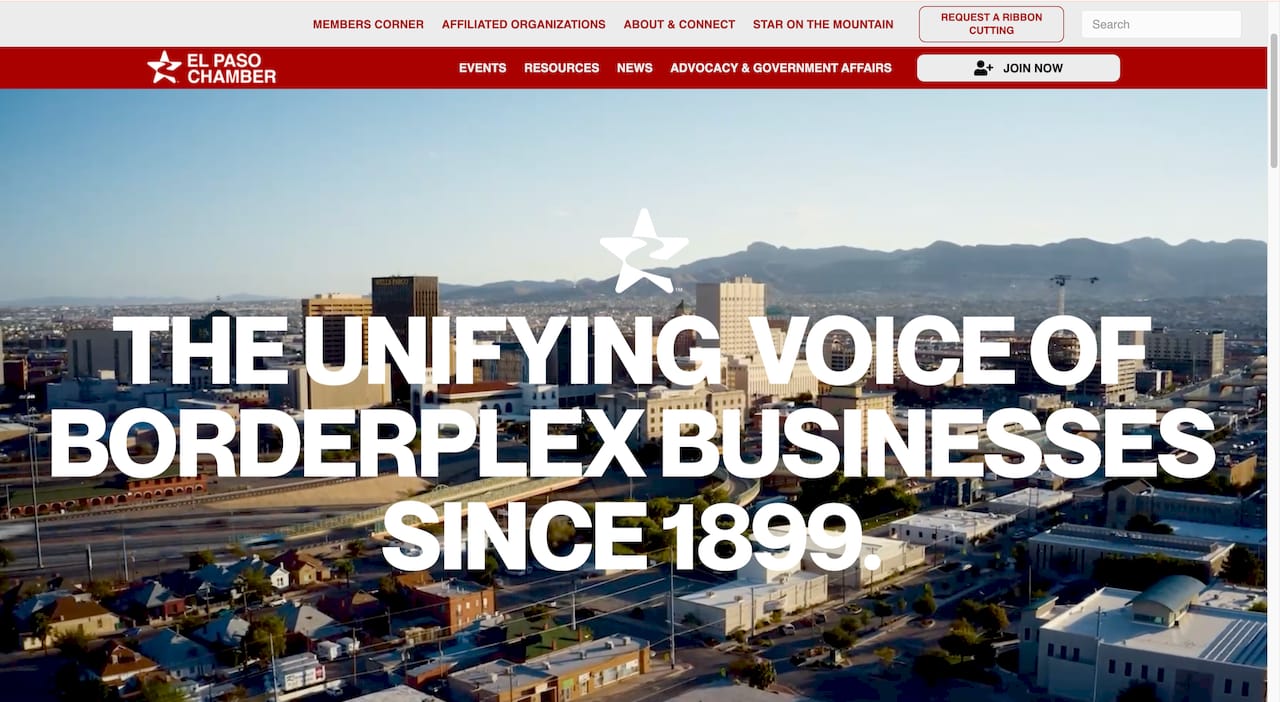
The biggest UX failure on chamber sites isn’t visual, it’s structural. Navigation menus buried under vague labels like “Resources” or “Community” force visitors to guess where information lives. Rename menu items to match what people actually search for: “Find a Business,” “Upcoming Events,” “Become a Member.” Specific labels beat clever ones every time.
Mobile layout deserves particular attention because most chamber site traffic now arrives on a phone, often from someone standing outside a downtown business trying to confirm hours. If your event calendar or member directory requires pinching and zooming to read on a phone screen, you’re losing that visitor before they find what they need.
Contrast and typography choices that look fine on a designer’s monitor often fail for older residents, a significant share of chamber site visitors in rural communities. Larger body text, clear heading hierarchy, and generous spacing between clickable elements aren’t stylistic preferences. They’re the difference between a site a 70-year-old business owner can navigate alone and one that requires a phone call to your office for help.
Does Your Chamber Site Need to Connect to Social Media?
Your website and your social media accounts should function as one system, not two disconnected efforts. Members expect to click through from a Facebook event post and land on a registration page that actually works, not a homepage they have to search from scratch.
Practical integration means embedding a live social feed on your homepage so the site never looks abandoned between updates, adding one-click social sharing to every event and news page, and making sure your Open Graph tags are set up correctly so shared links display the right image and headline instead of a blank preview box.
Beyond social feeds, your CRM and email tools should talk to your website too. If a business fills out a membership inquiry form, that lead should flow directly into your member management system, not sit in an inbox someone checks twice a week. Chambers running SMS and email campaigns alongside their website see better follow-through on event registration and renewal reminders. A connected system, like Southwind Connect℠, keeps your marketing tools and your website working from the same member data instead of three separate spreadsheets.
What Analytics Should a Chamber Actually Track?
Most chambers install Google Analytics once during a redesign and never look at it again. That’s a wasted asset. A handful of numbers tell you whether your site is actually doing its job.
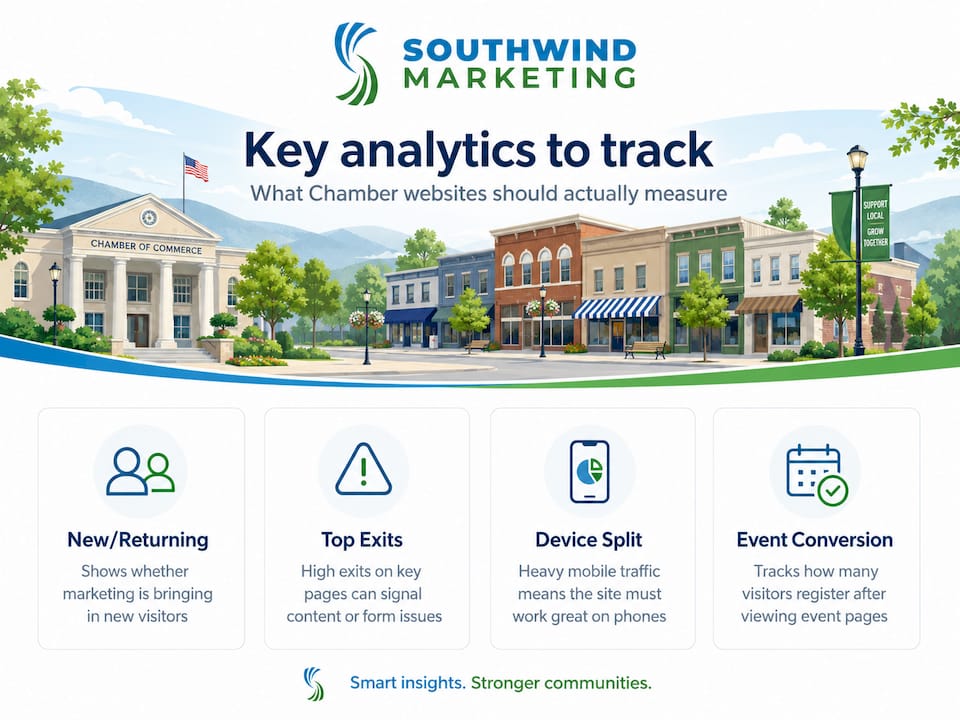
Track new versus returning visitors to see whether your marketing is bringing new people to the site or just cycling through the same members. Track your top exit pages, the pages people leave from most often, since a high exit rate on your membership application page usually means the form itself is the problem. Track mobile versus desktop traffic split, since a site that skews heavily mobile but isn’t optimized for it is actively losing visitors mid-visit.
Event page conversion, the percentage of visitors who land on an event page and actually register, is one of the clearest signals of whether your events function is working. Content marketing guidance for chambers recommends tracking these engagement numbers monthly, not just at renewal time, so you catch a broken form or a confusing page before it costs you a quarter’s worth of sign-ups.
Report these numbers to your board in plain terms tied to outcomes: membership inquiries generated, event registrations completed, directory searches performed. A traffic number alone tells your board nothing about whether the site is earning its budget line.
Is Your Chamber’s Content Actually Working?
A scorecard isn’t complete without judging what’s actually written on the page. Most chamber websites suffer from the same content problem: pages written once during launch and never revisited, full of vague language that could describe any chamber in the country.
Audit your top five pages and ask a blunt question of each one: would a business owner researching whether to join know exactly what they’d get? “We support local business” says nothing. “Members get listed in our searchable directory, access to our monthly networking events, and inclusion in our co-op advertising program” tells a business owner what they’re actually paying for.
Event and news pages need the same scrutiny. Stale content, an events page still showing last spring’s festival, signals to both visitors and search engines that the site isn’t maintained. Fresh, specific, member-focused content consistently outperforms generic chamber boilerplate for both engagement and search visibility.
Set a simple content calendar: one member spotlight, one event update, and one news post monthly at minimum. It’s a small commitment that keeps your site from looking abandoned between board meetings.
Common Mistakes Rural Chambers Make (And What to Do Next)
The same three mistakes show up again and again in rural chamber sites: directories parked on subdomains that never build search authority, accessibility overlays purchased instead of real fixes, and no single staff member with ownership of the site once the launch vendor leaves. Rural chambers don’t need a bigger agency. They need a partner who understands a $15,000 procurement process is different from a $150,000 city contract, and who won’t disappear after launch. Run this scorecard now, and put a staging demo requirement in every future RFP.
— Damien Denmark
How Southwind Marketing Helps Chambers Score Higher
Southwind Marketing is the alternative to a big-city agency for chamber websites: we build for procurement realities small chambers actually face, not enterprise contracts padded with features you’ll never use. We’ve worked directly on small city and government web projects, including the kind of accessibility and directory rebuilds this scorecard is built around, and we know the difference between a proposal that sounds good and one that survives a board vote.
Our chamber web design work covers ADA compliance built in from the start, SEO and AEO structured around how members and residents actually search, and ongoing support through Southwind Guardian℠ so your site doesn’t quietly decay six months after launch. When you request a proposal from us, or from anyone, ask for a staging demo, written accessibility testing evidence, and a maintenance schedule with clear milestones. If you want to see how this plays out for organizations like yours, our case studies walk through real chamber and city projects. Ready for a second opinion on your current site? Request a scorecard review from Southwind Marketing and find out where your score actually stands.
Where to Go for More on Chamber Website Standards
Ada for the technical standards behind accessible design.
The 2024 ADA web rule for compliance timelines affecting public-facing sites.
The Chamber Website Audit for a printable, renewal-ready checklist.
Why Chambers Need Digital Marketing to Grow for the case behind treating your site as core infrastructure.
Sources
FAQ
What does a Chamber Website Scorecard actually measure?
It scores accessibility, mobile performance, SEO and directory visibility, membership and event functionality, CMS usability, and hosting reliability on a simple 0 to 3 scale per category.
How long does it take to run a scorecard yourself?
Most chambers can complete a first-pass scorecard in one to three days using existing staff, combining an automated crawl with manual accessibility and user-journey checks.
Does my chamber legally need to meet WCAG standards?
Private chambers aren’t automatically bound by the 2024 ADA rule that applies to state and local governments, but ADA.gov’s guidance recommends WCAG and Section 508 practices for any public-facing organization, and shared hosting or funding with a municipality can change your obligations.
Why does directory hosting on a subdomain hurt visibility?
Search engines frequently treat a subdomain as a separate site from your main domain, so your member directory doesn’t inherit your chamber’s existing search authority the way a subdirectory structure does.
What should I require in a chamber website vendor proposal?
Ask for a live staging demo, written manual accessibility testing evidence, milestone-based deliverables, and a maintenance contract covering updates after launch, which is standard practice for hosts like Southwind Guardian℠.