
Cities must bring their web content and mobile apps into conformance with WCAG 2.1 Level AA by April 26, 2027 if your public entity serves a total population of 50,000 or more, or by April 26, 2028 if your population falls below 50,000 or your entity is a special district government. The Department of Justice Interim Final Rule (IFR), effective April 20, 2026, extended the original deadlines by one year — giving Kansas cities more runway, but not a pass.
Three things your team should start this week:
- Create a digital inventory. List every website, subdomain, mobile app, and third-party portal your city provides or makes available to the public.
- Assign a project owner. Name one person accountable for compliance — typically the city manager, ADA coordinator, or IT director — and define supporting roles for the clerk, PIO, and department heads.
- Prioritize high-impact content. Flag permitting forms, utility payment portals, public notices, PDFs, and any video content for first-wave remediation.
| Entity type | Compliance deadline |
|---|---|
| Public entities with larger total populations | A first compliance deadline deferred by one year |
| Public entities with smaller total populations and special district governments | A second, later compliance deadline deferred by one year |
The League of Kansas Municipalities featured ADA compliance for cities as a session topic at its 2026 Annual Conference for good reason: most Kansas municipalities are in the under-50,000 bucket, which means you have until April 26, 2028 — but that timeline disappears fast when you factor in inventory, auditing, vendor negotiations, staff training, and phased remediation. Start now.
Key Takeaways
Cities that act now — naming an owner, completing an inventory, and beginning prioritized remediation — will reach their 2027 or 2028 deadline with documented evidence of good-faith compliance rather than a last-minute scramble.
| Point | Details |
|---|---|
| Know your deadline | April 26, 2027 for entities with 50,000+ population; April 26, 2028 for under 50,000 and special districts. |
| WCAG 2.1 Level AA is the standard | Every web page, form, PDF, video, and mobile app must conform to this DOJ-adopted technical standard. |
| Start with inventory and ownership | Name a project owner and document every website, app, and vendor portal before any remediation begins. |
| New content breaks compliance | Train content authors now — every untagged PDF or unlabeled form field posted after launch reintroduces barriers. |
| Southwind Marketing builds accessibility in | Southwind's municipal website builds include WCAG 2.1 AA conformance as a baseline, not an add-on subscription. |
Table of Contents
- What does the DOJ Title II web rule actually require?
- Who does the rule apply to, and when is your deadline?
- Nine steps every city should take before the deadline
- How to audit and test your city's website and apps
- How to make vendors accountable for accessibility
- A phased plan for small and rural Kansas cities
- Common violations and fixes you can make this week
- Enforcement, complaints, and reducing your city's legal risk
- Building a governance model that survives staff turnover
- Resources and templates you can use right now
- Why accessibility built in beats accessibility bolted on
- Southwind Marketing's municipal accessibility review
- Sources
- FAQ
What does the DOJ Title II web rule actually require?
The Americans with Disabilities Act Title II has always required state and local governments to make their programs and services accessible to people with disabilities. What changed in 2024 is that the DOJ issued a final rule specifying exactly what "accessible" means for websites and mobile apps: conformance with WCAG 2.1 Level AA, incorporated by reference as the binding technical standard.
The scope: what the rule covers
The rule applies to web content and mobile applications that a public entity provides or makes available — directly or through contractual arrangements with third parties. That includes your city's main website, department subdomains, citizen-facing apps, online forms, PDFs posted for public use, and video content. If a vendor hosts your permitting portal or your utility billing system, and residents use it to interact with city services, it counts.
What WCAG 2.1 Level AA means in plain English
WCAG stands for Web Content Accessibility Guidelines, published by the World Wide Web Consortium (W3C). Level AA is the middle tier — more demanding than Level A, less demanding than Level AAA. The four organizing principles are:
- Perceivable: Content must be presentable in ways users can detect — alt text for images, captions for video, sufficient color contrast.
- Operable: All functionality must work via keyboard, not just a mouse; no content that flashes in ways that could trigger seizures.
- Understandable: Pages must use clear language, consistent navigation, and helpful error messages on forms.
- Robust: Code must be clean enough for assistive technologies — screen readers, switch controls, voice navigation — to interpret correctly.
The IFR extended both compliance dates by one year. The Federal Register notice explains that the DOJ cited resource and technology constraints for covered entities as the rationale. The extension gives cities more time to plan, but the underlying WCAG 2.1 Level AA standard and the rule's scope remain unchanged.
Five narrow exceptions
The rule includes limited exceptions, but they are narrower than most cities assume. Per the Small Entity Compliance Guide:
- Archived web content that was created before the compliance date, is kept only for reference, and has not been changed since archiving.
- Preexisting conventional electronic documents (PDFs, Word files) posted before the compliance date — unless they are currently used to apply for, access, or participate in a city's services.
- Content posted by third parties that is not posted under a contractual arrangement with the city and that the city does not control.
- Linked third-party content that is not under the city's control and is not provided under a contractual arrangement.
- Individualized, password-protected documents created for a specific person (e.g., a personalized billing statement).
Even when an exception applies, the city may still need to provide access to the underlying information through an alternative means — a phone line, a staff-assisted process, or a printed document. An exception is not a free pass to leave residents without access.
Who does the rule apply to, and when is your deadline?
Every state and local government entity covered by Title II of the ADA must comply. That means cities, counties, townships, school districts, transit authorities, library systems, and special districts — any governmental body that provides public services.
How to determine your compliance date
Your deadline is based on total population as measured by the most recent decennial Census. Per the Title II Center's deadline summary, "total population" refers to the population of the geographic area the public entity serves, not just registered voters or active service users. To find your number:
- Go to the U.S. Census Bureau's data portal and look up your city or district's 2020 decennial Census population.
- If your entity serves multiple jurisdictions (a regional transit authority, for example), use the combined population of the area served.
- Special district governments — regardless of population — always fall into the April 26, 2028 bucket.
Department-level coverage
The rule covers the public entity as a whole, not individual departments. If your city's total population puts you in the 2027 bucket, every department's web content follows that date — the police department's online records request portal, the library's digital catalog, the parks department's event registration form. There is no department-by-department opt-out.
| Scenario | Entity type | Compliance date |
|---|---|---|
| City over 50,000 residents | General-purpose government, 50,000+ | April 26, 2027 |
| City under 50,000 residents | General-purpose government, under 50,000 | April 26, 2028 |
| Rural water district, any size | Special district government | April 26, 2028 |
| County library system, county pop. 60,000 | Follows parent entity population | April 26, 2027 |
Practical checklist for determining scope:
- Identify every domain and subdomain your city owns or controls.
- List every third-party platform your city has contracted to deliver public services (utility billing, permitting, court payments, recreation registration).
- Identify any mobile apps published under your city's name or through a vendor arrangement.
- Flag any content your city posts on third-party platforms (YouTube, Facebook, Nextdoor) that serves as a primary channel for public notices or service information.
Nine steps every city should take before the deadline
ADA.gov recommends that public entities start with inventory, role assignment, and procurement integration. The nine steps below build on that framework into a full municipal playbook.
- Appoint a project owner and team. Name an ADA coordinator or project lead with authority to direct IT, the clerk's office, and department heads. Without a named owner, nothing moves.
- Build a complete digital inventory. Document every website, app, PDF library, video archive, and third-party portal. Include URLs, content owners, and last-updated dates.
- Run an automated accessibility scan. Use tools like WAVE, Axe, or Deque's axe-core to get a baseline violation count across your main site and key subdomains. Automated scans catch roughly 30–40% of WCAG issues — they are a starting point, not a finish line.
- Conduct manual and assistive-technology testing. Keyboard-only navigation, screen reader testing with NVDA or JAWS, and color contrast checks catch what automated tools miss.
- Review all vendor contracts. Identify which third-party platforms fall under the "provided or made available" scope and confirm whether current contracts include accessibility requirements.
- Build a prioritized remediation plan. Rank items by traffic volume and service criticality. Fix the utility payment portal before the archived 2019 council minutes.
- Train staff. Content authors, clerks, and IT staff all need role-specific training. New content posted after launch can reintroduce accessibility barriers — training is the only sustainable fix.
- Publish an accessibility statement. Post a public-facing statement that names your standard (WCAG 2.1 Level AA), describes your compliance status, and provides a contact channel for accessibility requests.
- Establish a monitoring cadence. Schedule weekly automated scans, monthly manual checks, and quarterly assistive-technology reviews. Accessibility is not a one-time project.
Who owns what
| Role | Primary responsibilities |
|---|---|
| City manager / administrator | Executive sponsor; budget authority; council briefings |
| ADA coordinator | Day-to-day project lead; complaint intake; documentation |
| IT director / staff | Automated scans; code remediation; vendor technical oversight |
| City clerk | Document accessibility (PDFs, agendas, minutes); records management |
| PIO / communications | Content author training; video captions; social media accessibility |
| Procurement / finance | Contract language; vendor RFP requirements; budget tracking |
Prioritization matrix — fix in this order:
- High traffic + high service impact: utility billing, permitting forms, court payment portals, public safety notices.
- High traffic + moderate impact: meeting agendas and minutes, job application pages, parks and recreation registration.
- Lower traffic + high impact: emergency alert sign-up forms, public comment submission pages.
- Lower traffic + lower impact: archived documents, historical photo galleries, older news releases.
How to audit and test your city's website and apps
A credible audit combines three methods: automated scanning, manual review, and assistive-technology validation. No single method alone is sufficient.

Audit workflow
Step 1: Automated scan. Crawl your site with WAVE (free browser extension), Axe DevTools, or Deque's axe-core. Export results and sort by violation type. Focus first on missing form labels, missing alt text, and contrast failures — these are the most common and the most fixable.
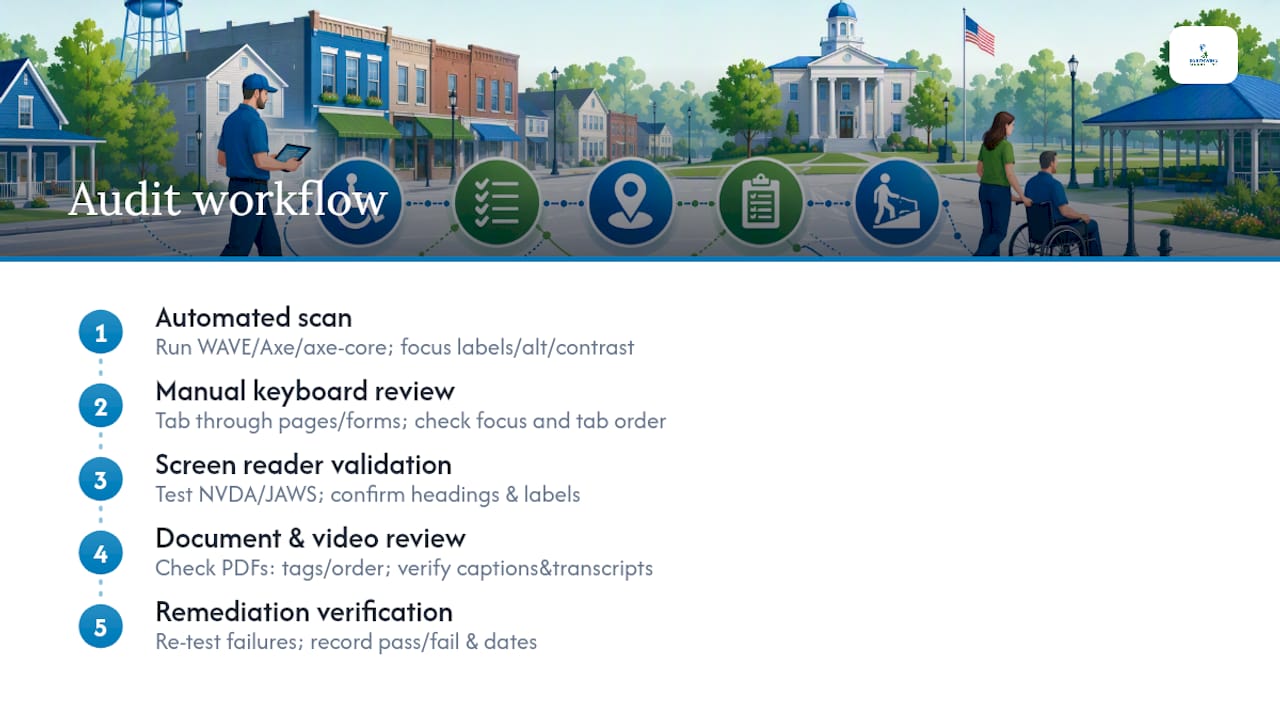
Step 2: Manual keyboard review. Navigate every page and every form using only the Tab, Enter, Shift+Tab, and arrow keys. Confirm that focus indicators are visible, that tab order is logical, and that no interactive element is keyboard-inaccessible. This catches modal dialogs, dropdown menus, and date pickers that automated tools often miss.
Step 3: Screen reader validation. Test with NVDA (free, Windows) or JAWS (paid, widely used in government) on your highest-traffic pages. Confirm that headings are structured logically, that form fields are labeled, that error messages are announced, and that images have meaningful alt text.
Step 4: Document and video review. Open every PDF linked from your main navigation and test it with Adobe Acrobat's accessibility checker. Confirm that PDFs are tagged, have a reading order, and include document titles. For videos, verify that captions are accurate (not auto-generated without review) and that transcripts are available.
Step 5: Remediation verification. After fixes are applied, re-test the specific items that failed. Document pass/fail results and dates.
Sample acceptance criteria for common municipal content
| Content type | Pass criteria |
|---|---|
| Online permitting form | Every input has a programmatic label; error messages identify the field and describe the fix |
| Utility payment portal | Keyboard-navigable; no timeout without warning; color not the only error indicator |
| Council meeting video | Accurate closed captions; transcript available; audio description for visual-only content |
| PDF agenda or application | Tagged PDF; logical reading order; document title set; no scanned image-only pages |
| City homepage | All images have alt text or are marked decorative; heading hierarchy is H1 → H2 → H3; skip navigation link present |
Pro Tip: Test vendor-managed portals — utility billing, court payments, recreation registration — separately and document the results. If a vendor's portal fails, you need that evidence to enforce your contract and to demonstrate good-faith compliance efforts to the DOJ.
For practical WCAG implementation patterns, the Silk Data WCAG case studies show how organizations have worked through common remediation scenarios in real-world deployments.
How to make vendors accountable for accessibility
Most municipal accessibility failures live in vendor-managed platforms. Your permitting software, your utility billing portal, your online court payments — if residents use them to access city services, they are in scope, and your city is responsible even if a vendor built and hosts them.
Contract language that actually works
Add these provisions to every new contract and every renewal:
- WCAG 2.1 Level AA conformance requirement. State explicitly that all web content and mobile app features delivered under the contract must conform to WCAG 2.1 Level AA. Cite the DOJ Title II rule as the regulatory basis.
- Accessibility conformance report (ACR). Require the vendor to provide a current Voluntary Product Accessibility Template (VPAT) or equivalent ACR before contract execution and annually thereafter.
- Remediation SLA. Define timelines: critical barriers (keyboard inaccessibility, missing form labels) remediated within 30 days; moderate issues within 90 days.
- Acceptance testing rights. Reserve the right to conduct independent accessibility testing before accepting any new release or major update.
- Indemnification language. Consult your city attorney, but include language that allocates liability for accessibility failures in vendor-controlled code to the vendor.
Due diligence checklist for vendor proposals
- Does the vendor's VPAT cover the specific modules your city will use, or is it a generic document?
- Can the vendor demonstrate a documented accessibility testing process (not just a policy statement)?
- Does the vendor offer a remediation commitment with defined timelines, or only "best efforts" language?
- What is the vendor's process for handling accessibility complaints submitted through your city's contact channel?
- Does the contract allow you to exit without penalty if the vendor fails to meet accessibility SLAs?
Questions to ask during RFP evaluation:
- "Show us your most recent third-party accessibility audit report."
- "What is your remediation timeline for critical WCAG 2.1 AA failures?"
- "Does your platform support keyboard-only navigation for all user-facing workflows?"
- "What training do you provide to city staff who manage content in your platform?"
Proprietary platforms that bundle remediation as a paid subscription add-on are a red flag. Accessibility should be a baseline deliverable, not an upsell. When evaluating platforms, ask whether WCAG conformance is built into the product roadmap or sold as a separate service tier.
A phased plan for small and rural Kansas cities
You do not need to fix everything at once. ADA.gov's guidance is explicit: a defensible strategy is to inventory, prioritize high-use content, and phase remediation while documenting your decisions. For a Kansas city of 8,000 with a two-person IT team, that is not just practical — it is the recommended approach.
A realistic 365-day remediation sequence
- Days 1–30: Inventory and governance. Complete your digital inventory. Name your project owner. Run an automated scan on your main site and top five linked documents. Identify your three highest-risk items (usually the utility portal, the permitting form, and the most-downloaded PDF).
- Days 31–90: Quick wins and vendor review. Fix alt text, form labels, and color contrast issues flagged by the automated scan. Send accessibility requirement notices to all vendors. Request VPATs from every platform provider.
- Days 91–180: Manual testing and medium-term remediation. Conduct keyboard and screen reader testing on your top 20 pages. Remediate heading structure, focus order, and keyboard traps. Convert your most-used PDFs to tagged accessible PDFs or HTML equivalents.
- Days 181–365: Deep remediation and training. Address video captioning across your archive. Complete staff training for content authors and clerks. Publish your accessibility statement. Establish your monitoring cadence.
Budgeting for small cities
- Use existing staff for inventory and content fixes — clerks and PIOs can handle alt text and document remediation with proper training.
- Tap regional shared services where available. Some Kansas councils of government offer shared IT support that can be directed toward accessibility work.
- Check USDA Community Facilities grants and CDBG allocations for technology improvement funding — accessibility remediation qualifies as a public facility improvement in some programs.
- Build accessibility into your next website redesign budget rather than funding a separate remediation project. A standards-based rebuild with accessibility baked in costs less over five years than layering fixes onto a proprietary platform.
Equivalent facilitation is available when a specific technical barrier is genuinely unavoidable. If a legacy system cannot be made keyboard-accessible before your compliance date, document the barrier, the remediation timeline, and the alternative access method you are providing (a phone number, a staff-assisted process). That documentation is your evidence of good faith.
Common violations and fixes you can make this week
Most municipal websites fail on the same handful of issues. The good news: several of the most common violations are also the fastest to fix.
The most frequent WCAG failures on city sites:
- Missing alt text on photos, logos, maps, and infographics. Screen readers skip these entirely or read the file name aloud.
- Unlabeled form fields. A field that says "Enter your address" as placeholder text only — with no programmatic label — is invisible to screen readers.
- Poor color contrast. Gray text on a white background, or light-colored text on a colored button, fails the WCAG 1.4.3 contrast ratio requirement (4.5:1 for normal text).
- Inaccessible PDFs. Scanned documents saved as image-only PDFs have no text layer and cannot be read by any assistive technology.
- Video without captions. Auto-generated captions from YouTube or Zoom are not sufficient without human review for accuracy.
- Broken keyboard navigation. Dropdown menus, modal dialogs, and date pickers that only work with a mouse lock out keyboard and switch-control users.
- Skipped heading levels. Jumping from H1 to H3 breaks the document outline that screen reader users rely on to navigate.
Quick wins for content authors
- Write descriptive alt text for every image that conveys information. "City Hall exterior" is better than nothing; "City Hall exterior, 123 Main Street, Anytown, KS" is better still. Decorative images get an empty alt attribute (
alt=""). - Tie every form label to its input using the
forattribute — not just visual proximity. - Add accurate captions to every video before publishing. Review auto-generated captions for errors before enabling them.
- Convert critical PDFs to tagged accessible PDFs using Adobe Acrobat Pro's Make Accessible tool, or replace them with HTML pages.
- Use descriptive link text. "Click here" and "Read more" are meaningless to screen reader users navigating by links. "Download the 2025 Annual Water Quality Report (PDF)" is correct.
Content author checklist for new posts
Before publishing any new page, document, or video:
- [ ] All images have alt text or are marked decorative.
- [ ] Heading levels are sequential (H1 → H2 → H3).
- [ ] All links have descriptive anchor text.
- [ ] Any PDF is tagged and has a document title.
- [ ] Any video has reviewed, accurate captions.
- [ ] Form fields have programmatic labels.
- [ ] Color contrast meets 4.5:1 for body text.
New content is where accessibility breaks down after launch. A single staff member posting an untagged PDF or an image with no alt text reintroduces barriers the remediation project just removed. Training content authors is not optional — it is the only way to maintain compliance over time. For a practical process roadmap, the website accessibility process guide walks through how to build a repeatable content review workflow.
Enforcement, complaints, and reducing your city's legal risk
Title II enforcement works through two channels: DOJ investigations and private lawsuits. Both are real risks for municipalities.
How complaints reach you:
- A resident files a complaint with the DOJ Civil Rights Division, which investigates and may issue a letter of findings or negotiate a settlement agreement.
- A resident files directly in federal court under Title II's private right of action. Unlike some civil rights statutes, Title II does not require exhausting administrative remedies before filing suit.
- A complaint triggers a DOJ compliance review of your entire digital presence, not just the specific page or feature the complainant identified.
If you receive a complaint:
- Acknowledge receipt in writing within 48 hours.
- Triage the specific barrier identified and assign a remediation owner.
- Document the barrier, the remediation steps taken, and the timeline.
- Respond to the complainant with your remediation plan and timeline.
- Retain all correspondence, audit reports, and remediation records.
What to keep in your evidence log
- Dated automated scan reports (before and after remediation).
- Manual and AT test results with pass/fail documentation.
- Staff training records (who was trained, on what, and when).
- Vendor correspondence (accessibility requests, VPAT submissions, SLA responses).
- Remediation timelines and completion dates.
- Your accessibility statement and any updates to it.
Phased remediation with documented governance reduces legal exposure even before you reach full WCAG conformance. Courts and DOJ investigators look for good-faith effort, documented prioritization, and a credible timeline. A city that can show a dated inventory, a remediation log, and staff training records is in a materially better position than one that has done nothing.
Building a governance model that survives staff turnover
Accessibility is not a project with an end date. Every new page published, every new PDF uploaded, every new vendor platform deployed is an opportunity to introduce a new barrier. Governance is what keeps the work from unraveling.
Governance checklist:
- Written accessibility policy adopted by the city council or city manager.
- Named ADA coordinator or project owner with defined responsibilities.
- Annual review of the digital inventory and accessibility statement.
- Content posting checklist distributed to all staff who publish web content.
- Vendor management process that includes accessibility requirements in every new contract and renewal.
- Documented complaint intake and response process.
Training cadence by role
| Role | Onboarding | Quarterly | Annual |
|---|---|---|---|
| Content authors (clerks, PIOs, dept. staff) | WCAG basics, alt text, PDF tagging, link text | New content checklist review | Full WCAG 2.1 AA refresher |
| IT staff | Automated scanning tools, code remediation, semantic HTML | Scan results review, new tool updates | AT testing deep-dive |
| Procurement / finance | Contract language, VPAT review | Vendor SLA check | RFP template update |
| City manager / elected officials | Compliance overview, risk briefing | Status update | Annual compliance report |
Monitoring schedule
- Weekly: Run automated scans on your main site and top 10 pages. Review new content posted in the prior week.
- Monthly: Manual keyboard review of any new forms, portals, or interactive features added since the last check.
- Quarterly: Full assistive-technology test of your top 20 pages and any vendor-managed portals.
- Annually: Full site audit, accessibility statement update, staff training refresh, vendor VPAT review.
Publishing your accessibility statement. Post it at a consistent, easy-to-find URL (e.g., yourcity.gov/accessibility). Include: the standard you are conforming to (WCAG 2.1 Level AA), your current conformance status, known limitations and your remediation timeline, and a contact method for accessibility requests. Update it whenever your conformance status changes. For guidance on ongoing website support for municipalities, including monitoring workflows, Southwind Marketing has published a dedicated resource for city teams.
Resources and templates you can use right now
You do not need to build everything from scratch. These official sources and tools give you a head start.
Official DOJ and federal resources:
- Ada — the DOJ's own recommended starting point for public entities; covers inventory, roles, procurement, and training.
- Ada — written specifically for smaller governments; explains exceptions, the compliance calendar, and planning steps.
- Ada — full overview of the 2024 final rule, WCAG 2.1 Level AA requirements, and links to the Federal Register notices.
- DOJ IFR (2026) — the Interim Final Rule extending compliance dates; essential for council briefings and procurement documentation.
- Federal Register IFR notice — the regulatory text and DOJ rationale for the extension.
Technical standards:
- W3C WCAG 2.1 documentation (w3.org/TR/WCAG21) — the authoritative source for all success criteria; bookmark the "Understanding WCAG 2.1" companion document for plain-English explanations.
- Silk Data WCAG case studies — real-world remediation examples organized by WCAG criterion; useful for IT staff and contractors.
Templates to build or adapt:
- Digital inventory spreadsheet: columns for URL/document name, content owner, content type, last updated, accessibility status, and remediation priority.
- Remediation log: item description, WCAG criterion violated, assigned owner, target remediation date, completion date, and re-test result.
- Evidence log: audit report date, testing method, pass/fail summary, staff training records, vendor correspondence dates.
- Sample contract clause: "Vendor shall ensure all web content and mobile application features delivered under this agreement conform to WCAG 2.1 Level AA. Vendor shall provide an updated Voluntary Product Accessibility Template (VPAT) upon request and within 30 days of any major release."
- Acceptance test case template: test ID, WCAG success criterion, test steps, expected result, actual result, pass/fail, tester name, date.
For a deeper look at how ADA compliance applies to city websites, including Kansas-specific context and practical next steps for city managers, Southwind Marketing's municipal resource library covers the full scope.
Why accessibility built in beats accessibility bolted on
Most of the rural Kansas cities Southwind Marketing works with face the same situation: a website built on a proprietary platform, a vendor contract that says nothing about WCAG, and a staff of two or three people who are responsible for everything from posting meeting agendas to managing the city's Facebook page. Accessibility was never part of the original conversation — and now it has to be.
The proprietary platform problem is real. Several municipal CMS vendors charge separately for accessibility remediation, sell "accessibility overlays" as a compliance solution (they are not), and lock cities into multi-year contracts that make it expensive to leave even when the platform fails to meet the standard. A city that pays a monthly overlay subscription is not compliant — overlays do not fix underlying code failures, and the DOJ has not endorsed them as a substitute for WCAG conformance.
Southwind Marketing's approach is different. Accessibility is part of the build specification, not an add-on invoice. When we design a municipal website, WCAG 2.1 Level AA conformance is a baseline requirement, not a premium feature. Southwind Guardian℠ managed hosting includes ongoing maintenance that catches new content issues before they accumulate. Southwind Signal℠ SEO and content automation produces accessible content by default — properly structured headings, descriptive link text, and alt text built into the content workflow. For cities that need fractional IT support to manage scanning tools, vendor oversight, and staff training, Southwind Cloud℠ provides that capacity without a full-time hire. And Civic Intelligence℠ resident surveys can validate whether residents with disabilities are actually finding your services accessible — closing the loop between technical conformance and real-world usability.
The contrast with costly proprietary platforms is not just philosophical. The City of Ulysses, Kansas replaced CivicPlus with a WordPress-based site built by Southwind Marketing — moving from a locked, expensive platform to an open, standards-based site they control. That kind of move is exactly what small Kansas cities should be considering as they plan for 2028 compliance.
Southwind Marketing's municipal accessibility review
Kansas city leaders who want a clear picture of where they stand before the 2027 or 2028 deadline can request a municipal website accessibility review from Southwind Marketing. This is not a generic audit report — it is a practical, prioritized roadmap built for the staff and budget realities of small and mid-sized cities.
The review includes an automated scan across your main site and key subdomains, manual keyboard navigation testing, assistive-technology spot checks on your highest-traffic pages, a document review of your most-used PDFs, and a written remediation roadmap with items ranked by impact and effort. Deliverables map directly to Southwind services: Southwind Guardian℠ for ongoing maintenance and monitoring, Southwind Signal℠ for accessible content workflows, and Southwind Cloud℠ for fractional IT support on scanning and vendor oversight.
Reviews are available as a one-time project or as part of a retainer for cities that want continuous monitoring and quarterly reporting. Pricing is structured for municipal budgets — no enterprise-tier minimums, no proprietary platform lock-in. To get started, visit Southwind Marketing's website design for local government or request a free 10-minute audit to see where your site stands today.
Sources
The following official resources are the authoritative references for municipal ADA compliance planning, procurement documentation, and council briefings.
- Extension of Compliance Dates for Nondiscrimination on the Basis of Disability; Accessibility of Web Information and Services of State and Local Government Entities
- Federal Register, Volume 91 Issue 75 (Monday, April 20, 2026)
- Ada
- Federal Register, Volume 89 Issue 80 (Wednesday, April 24, 2024)
- Ada
FAQ
What are the current ADA web accessibility deadlines for cities?
The DOJ's Interim Final Rule, effective April 20, 2026, sets two dates: April 26, 2027 for public entities with a total population of 50,000 or more, and April 26, 2028 for entities under 50,000 and all special district governments.
What technical standard do cities have to meet?
Cities must conform to WCAG 2.1 Level AA, the standard adopted by reference in the DOJ's 2024 final rule. This covers perceivable, operable, understandable, and robust content across all public-facing web pages, forms, PDFs, videos, and mobile apps.
What are the most common ADA violations on city websites?
The most frequent failures are missing alt text on images, unlabeled form fields, insufficient color contrast, inaccessible (untagged) PDFs, videos without accurate captions, and broken keyboard navigation on interactive elements like dropdown menus and date pickers.
Does the rule apply to vendor-managed portals like utility billing or permitting software?
Yes. If your city provides or makes available a third-party platform for residents to access city services, that platform is in scope under Title II. Your city is responsible for ensuring vendor-managed content meets WCAG 2.1 Level AA, which is why accessibility requirements must be written into every vendor contract.
What should a city do if it cannot fix everything before the deadline?
Prioritize mission-critical services first — utility payments, permitting, public safety notices — and document every decision. A phased remediation plan with a dated inventory, audit reports, and staff training records demonstrates good-faith effort, which matters significantly in DOJ investigations and litigation. The Small Entity Compliance Guide covers equivalent facilitation options when specific technical barriers cannot be resolved immediately.